
iOS 27 arrives on 14 September 2026, and it is not a travel release. The headline is Siri AI. For anyone boarding a plane, four smaller things matter: your iPhone switches between Wi-Fi and cellular more smoothly, Call Context can surface a booking code when you ring an airline, Maps Flyover is sharper, and iPhone Handoff lets two iPhones share one number on supported carriers.
Just as important is what iOS 27 does not change. The travel eSIM automation that people credit to this release actually shipped in iOS 26 — the prompt to turn on a travel eSIM when you land, and the automatic switch back to your home line when you return. If you are already on iOS 26, you have it. And Apple’s own footnote says Siri AI “will not be initially available in the EU on iOS, iPadOS, and watchOS”, so the flagship feature is the one least likely to follow you to Paris.
- Release date: 14 September 2026, free update.
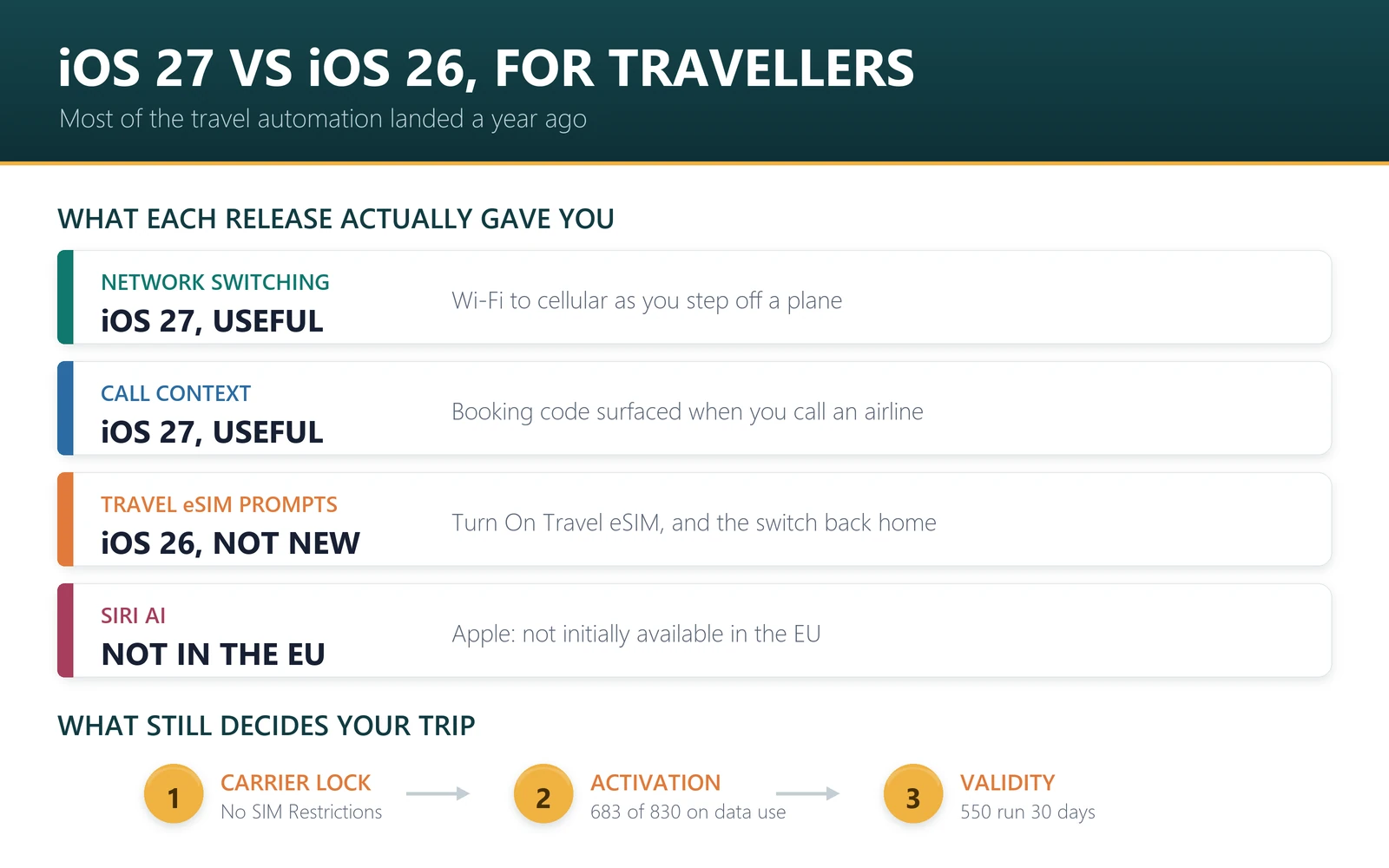
- Genuinely useful abroad: smoother Wi-Fi and cellular switching; Call Context for airline calls.
- Already yours on iOS 26: travel eSIM prompts on arrival and the switch back on return.
- Regional catch: Siri AI is not initially available in the EU.
- Unchanged: carrier lock rules, how travel eSIMs install, and which plan you need.
The iOS 27 changes that actually help abroad
Apple’s iOS 27 page lists dozens of features. These are the ones with a real travel use, in the order we would rank them.
| Feature | What Apple says | What it changes on a trip |
|---|---|---|
| Smoother network transitions | iPhone “more seamlessly chooses the best available Wi-Fi or cellular connection”, including “as you step off a plane” | The most travel-shaped change in the release: fewer dead moments between airport Wi-Fi and your travel eSIM |
| Call Context | Surfaces relevant information from your apps when you call a business, “like a confirmation code from Mail when you call an airline” | Useful in exactly the moment you are stressed: a delayed flight and a call to the airline |
| Enhanced Flyover in Maps | Flyover uses aerial imagery and Visual Intelligence to render fine detail | Orientation in an unfamiliar city; nice rather than necessary |
| iPhone Handoff | Lets users “with supported carriers” switch between two iPhones with the same phone number | Only matters if you carry a second iPhone as a travel phone. Apple has not published a carrier list |
| Safari Notify Me | Watches a page for changes such as a price drop or restock | Can watch a fare or hotel page, but it is not a flight-price tracker |
| Faster performance | App launches up to 30% faster, AirDrop up to 80% faster | Marginal abroad, pleasant everywhere |
Nothing in that list changes how you get online in another country. That still comes down to your plan, your phone’s lock status and the network your plan roams on, which is why we keep a separate guide to which network a travel eSIM actually uses.
The travel eSIM features people think are new
This is the most common misunderstanding we see after a September release, so it is worth being precise. Apple’s guide to using eSIM while travelling internationally attributes these to iOS 26, not iOS 27:
- If you buy a travel eSIM before leaving, iPhone may ask whether you plan to use it at home or while travelling.
- On arrival, a “Turn On Travel eSIM” notification offers two choices: Travel eSIM Only, or Travel eSIM and Current eSIM. Apple notes that keeping both on means your home eSIM “might still incur roaming fees”.
- On the way home, iPhone can turn the travel eSIM off and your home line back on automatically, “depending on your country or region”.
If those prompts have never appeared for you, the usual reason is that the travel line was installed before you updated, or the plan was already active. You can always do it by hand: Settings, Cellular, Cellular Data, then pick the line. Our guide to keeping your home number while using a travel eSIM walks through the settings.
Updating before a trip? The software is the easy part; the plan is what decides your data. Browse travel eSIM plans by destination, or go straight to Europe and Japan.
Should you update before a trip?
Yes, but not at the airport. Update at home, on Wi-Fi, at least a day before you fly, and check that your lines still work afterwards: make a call, send a message, and open a web page on cellular data.
The order matters if you are also installing a travel plan. Update first, then install the travel eSIM, then leave the travel line switched off until you land. Doing it the other way round is harmless but means you verify nothing until you are already abroad, which is the worst place to discover a problem. Our installation guide covers the screens, and eSIM not working covers the fixes.
One more reason not to leave it late: if your phone is new this month, the software update and the eSIM transfer are two separate jobs. Moving your number to iPhone 18 Pro explains the transfer, and the SIM tray question by country is in does iPhone 18 Pro have a SIM card slot. If you are also changing watches or clearing out the old handset, see what an Apple Watch can and cannot do abroad and the eSIM checklist before a trade-in.
What iOS 27 does not do for travellers
Being blunt about this is more useful than a feature list.
- It does not unlock your phone. A carrier-locked iPhone still cannot take another carrier’s eSIM. Check Settings, General, About, Carrier Lock for “No SIM Restrictions”.
- It does not change how travel eSIMs install. QR code or activation link, on Wi-Fi, before you fly.
- It does not pick a plan for you. Coverage, data amount and validity are still your decision, including whether one plan covers every country on your route.
- It does not make Apple Intelligence available everywhere. Apple’s feature availability page states that Siri AI will not be initially available in the EU on iOS, iPadOS and watchOS, and other Apple Intelligence features vary by language and region.
- It does not reduce data use. If anything, richer features and a faster phone encourage more of it.
That last point is where most trips actually go wrong, and it has nothing to do with the software version. The plan you choose decides what happens: of the 830 plans on sale in our catalogue on 12 September 2026, 683 start counting on first data use, 106 on first network connection and 41 the moment they are installed. The most common validity is 30 days, on 550 of them. Those three numbers matter more to your trip than anything in a release note. When an eSIM starts counting explains how to read them.
Sources, and what this cannot tell you
Feature descriptions and the 14 September release date are from Apple’s iOS 27 page and Apple’s iPhone 18 Pro announcement of 9 September 2026. The travel eSIM behaviour is from Apple’s support article on using eSIM while travelling, published 10 March 2026. The EU note is from Apple’s iOS and iPadOS 27 feature availability page. All read on 12 September 2026.
We wrote this before iOS 27 shipped, so nothing here is based on hands-on use, and Apple’s final release notes may differ. Feature availability varies by country, language and device; Apple’s feature availability page is the authority, not us. Catalogue figures are our own counts on 12 September 2026.
Frequently asked questions
When is iOS 27 released?
Apple says iOS 27 is available starting 14 September 2026 as a free software update. Apple Intelligence features and Siri AI, which is in beta, roll out with it for supported devices set to a supported language, with more languages arriving in October.
Does iOS 27 add new travel eSIM features?
No. The travel eSIM prompts belong to iOS 26: the option to mark an eSIM as a travel plan, the Turn On Travel eSIM notification when you arrive, and the automatic switch back when you return home. iOS 27 keeps them rather than adding to them.
What is Call Context in iOS 27?
Apple describes it as surfacing relevant information from your apps when you call a business, giving the example of a confirmation code from Mail when you call an airline. For travellers it is the most practical new feature in the release, though it depends on Apple Intelligence availability.
Should I update to iOS 27 before I travel?
Update at home on Wi-Fi a day or more before you fly, then test a call, a message and cellular data. Avoid updating at the airport or after landing, when a failed update or a slow download is hardest to deal with.
Is Siri AI available everywhere?
No. Apple’s feature availability page states that Siri AI will not be initially available in the EU on iOS, iPadOS and watchOS. Other Apple Intelligence features depend on the language your device is set to and on the region, so check Apple’s page for your destination.
Does iOS 27 change how my travel eSIM installs?
No. You still install from a QR code or an activation link, ideally on Wi-Fi before you fly, and turn the line on when you land. What the plan costs, where it works and when its clock starts are set by the plan, not by the iOS version.
What is iPhone Handoff?
Apple announced it with iPhone 18 Pro as an iOS 27 feature that lets users with supported carriers switch back and forth between two iPhones with the same phone number. Apple’s announcement does not list supported carriers, so ask yours before relying on it for a trip.
Will iOS 27 make my data last longer?
There is no reason to expect it to. Faster performance and richer features tend to increase data use rather than reduce it. Size the plan for how you actually travel, and check the activation rule: 683 of the 830 plans we sell only start counting on first data use.
Bottom line
Install iOS 27 before you leave, on your own Wi-Fi, and enjoy the smoother handoff between airport Wi-Fi and your travel plan. Do not expect it to solve anything that was already your decision: an unlocked phone, the right plan, and a profile installed before you fly still do all the real work. The feature travellers already rely on, the one that turns your travel eSIM on when you land, has been sitting in iOS 26 for a year.
Last reviewed 12 September 2026. iOS 27 features, release date and availability notes are from Apple’s product and feature availability pages and its 9 September 2026 announcement, read on that date and subject to change before release. Apple, iPhone, iOS and Siri are trademarks of Apple Inc.; this article is independent editorial commentary and is not affiliated with, sponsored by or endorsed by Apple. Illustrations are our own.