
Your phone number moves to iPhone 18 Pro with eSIM Quick Transfer, usually in a few minutes. Apple’s conditions: your carrier supports it, both iPhones are signed in to the same Apple Account, the old iPhone is unlocked with its passcode, both are nearby with Bluetooth on, and both run iOS 18.4 or later. When the line activates on the new phone, the SIM in the old one stops working.
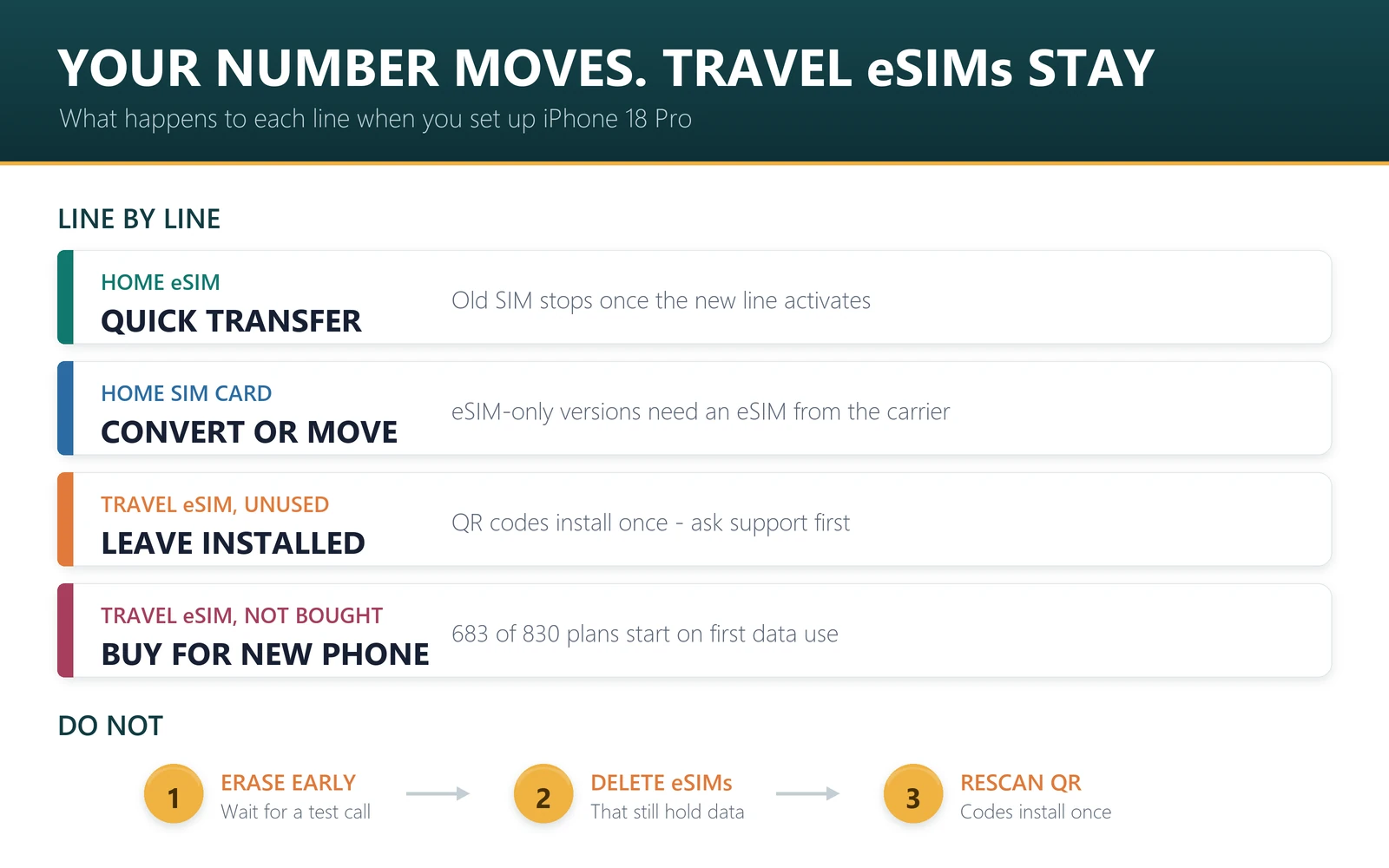
A travel eSIM is a different case. It comes from a travel provider, not your carrier, and most travel eSIM QR codes install only once. Delete it from the old phone and the plan is usually gone. Move your home line with Quick Transfer, and handle the travel eSIM separately, as set out below.
The timing is tight this month. iPhone 18 Pro pre-orders open on Saturday 12 September 2026, iOS 27 arrives on Monday 14 September and deliveries start on Friday 18 September. In the US, Canada, Mexico, Japan and the Gulf states, the new phone has no SIM tray at all. Anyone there upgrading from a physical SIM has to move the line to eSIM.
- Quick Transfer needs: carrier support, the same Apple Account on both phones, Bluetooth on, iOS 18.4 or later.
- More than one number: can be transferred during setup from iOS 26.
- The old phone: its SIM deactivates when the new line activates.
- Travel eSIMs: QR codes normally install once, so never delete one that still has data.
- Plan clocks: 683 of the 830 plans we sell do not start until first data use.
Before you start: five minutes that prevent most problems
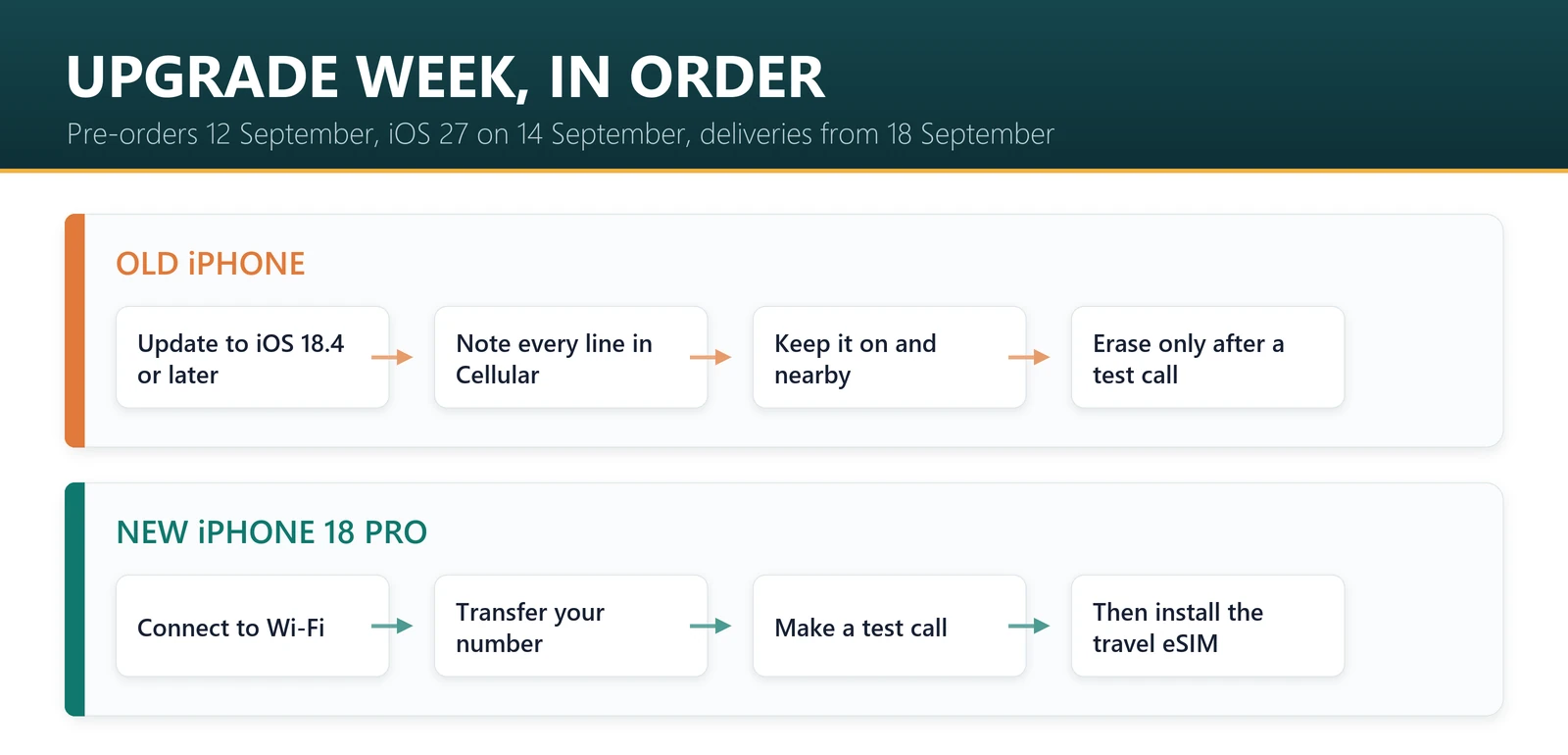
- Update the old iPhone to iOS 18.4 or later. iOS 27 is due as a free update on 14 September.
- Back it up to iCloud or a computer, and make sure you know your Apple Account password.
- Charge both phones and have Wi-Fi available. Apple asks you to connect the new iPhone to Wi-Fi or a hotspot for eSIM setup, although eSIM-only models can activate without Wi-Fi in some countries.
- List what is on the old phone. In Settings, Cellular, note every line: your home number, any work line and any travel eSIMs, and whether each travel plan has been used.
- Keep the old phone until the new one makes a call. Do not erase it, trade it in or remove any eSIM before then.
Move your home number with eSIM Quick Transfer
Apple’s eSIM setup guide gives two routes. The first is during setup: when the new iPhone asks whether to transfer your phone number, follow the prompts. From iOS 26 you can transfer more than one number at that stage.
If you skipped it, or want to move a second line later:
- On the new iPhone, open Settings and tap Cellular.
- Tap Set Up Cellular or Add eSIM.
- Choose the plan to transfer from another iPhone. If you do not see a list of numbers, tap Transfer From Nearby iPhone.
- On the old iPhone, tap Transfer to confirm, or enter the verification code the new iPhone shows.
- Wait for the plan to activate on the new iPhone, then make a test call.
If a banner appears saying “Finish Setting Up Your Carrier’s Cellular Plan”, tap it and you will be sent to your carrier’s website to finish the transfer. If Quick Transfer is not offered at all, your carrier does not support it and will need to issue the eSIM another way.
Which route applies to you
| Your old phone | Your new iPhone 18 Pro | What to do |
|---|---|---|
| iPhone with an eSIM | Any version | eSIM Quick Transfer, if your carrier supports it |
| iPhone with a physical SIM | eSIM-only (US, Canada, Mexico, Japan, Gulf) | Quick Transfer where your carrier can convert the SIM to eSIM; otherwise ask the carrier for an eSIM by QR code, app or in store |
| iPhone with a physical SIM | Tray version (UK, Europe, Australia, India, most of Asia) | Move the nano-SIM card across, or convert to eSIM if your carrier supports it |
| Android phone | Any version | Contact your carrier; from iOS 26, some carriers and phone makers support a direct Android-to-iPhone eSIM transfer |
| Carrier without Quick Transfer | Any version | Carrier app, activation link, QR code or manual entry, as the carrier instructs |
Not sure whether your new phone has a tray? The split by country is in does iPhone 18 Pro have a SIM card slot.
iOS 27’s iPhone Handoff: two iPhones, one number
Apple’s iPhone 18 Pro announcement introduces a related iOS 27 feature. iPhone Handoff “allows users with supported carriers to easily switch back and forth between two iPhone models with the same phone number”.
That could suit anyone who keeps an older iPhone as a spare, without a full transfer each time. But the announcement does not list which carriers support it, and iOS 27 is not out until 14 September. Treat it as a question for your carrier, not a reason to skip the normal transfer.
Upgrading before a trip? Buy the travel eSIM for the phone you will actually travel with. Browse data plans by destination and check each plan’s activation rule before you pay.
What happens to a travel eSIM when you change iPhone
Quick Transfer is built for your carrier’s line; Apple’s guide says it works “if your carrier supports eSIM Quick Transfer”. A travel eSIM is issued by a travel provider as a separate profile, usually through a QR code. Our own rule is plain: each QR code installs once, and a deleted profile cannot be reinstalled from the same code. Support can look at reissuing it, but that is not guaranteed. If you bought from another provider, check its policy before you move anything.
That is also the clearest practical advantage a physical SIM still has, as our eSIM vs physical SIM comparison sets out. So the right move depends on where the plan is in its life.
| Travel eSIM status | What to do | Why |
|---|---|---|
| Bought, QR code not yet scanned | Install it on the new iPhone only | Scanning it on the old phone uses up the one install |
| Installed on the old phone, never used | Leave it installed, and contact support with your order number before the trip | Deleting it usually voids the plan; a reissue may be possible |
| In use, mid-trip | Finish the trip on the old phone | The remaining data stays on the phone it was installed on |
| Used up or expired | Delete it from the old phone whenever you like | Nothing left to lose |
| Not bought yet | Wait for the new iPhone, then buy and install | Most plans do not start until you use data |
The last row is usually the easiest. Of the 830 plans on sale in our catalogue on 11 September 2026, 683 start on first data use and 106 on first network connection, so buying a few days early rarely costs anything. The exceptions: 41 plans start the moment they are installed, and 8 must be started within 30 days of purchase. When an eSIM starts counting explains how to read the activation line.
Timing an upgrade around a trip
Match the plan to the phone you will be holding at the departure gate.
- Flying before the new phone arrives: travel on the old iPhone. Install the travel eSIM there, and move to iPhone 18 Pro when you are home and the plan has run out.
- Flying a few days after delivery: set up the new phone, move your home number, make a test call, and only then buy and install the travel eSIM on iPhone 18 Pro.
- Trip weeks away: no rush. The most common validity in our catalogue is 30 days once started, on 550 of 830 plans, so buy after the phone arrives and install on Wi-Fi before you fly using the installation guide.
Apple’s dates are the constraint: pre-orders from 5 a.m. PT on 12 September, deliveries from 18 September in more than 65 countries and from 25 September in 20 more. If your phone lands the day before you leave, do the home-line transfer first. That is the part that stops calls, bank codes and messages from reaching you if it goes wrong, and it is what keeps your home number working alongside a travel eSIM.
If something goes wrong
- The old iPhone shows no service after the transfer. That is expected: Apple says activating the plan on the new iPhone deactivates the previous SIM.
- The new iPhone has no service. Restart it, check the line is switched on in Settings, Cellular, then contact your carrier. The home line is theirs to fix.
- A travel eSIM will not connect on the new phone. Check that data roaming is on for that line and that it is selected as the data line. Our troubleshooting guide and eSIM not working fixes cover the rest.
- You deleted a travel eSIM by mistake. Scanning the same QR code again will not bring it back. Contact support with your order number.
If you are buying a travel plan around an upgrade
The simplest way to avoid the transfer problem above is not to have one: set up the new iPhone first, then buy the travel plan and install it there directly. Each QR code installs once, so a plan that has only ever lived on the new phone never needs moving. All of these start counting on first use at your destination — first data use or first network connection, depending on the plan — rather than at purchase, so there is no penalty for installing a few days before the trip. Prices are from our catalogue on 23 September 2026 and move daily.
| Destination | Plan | Price |
|---|---|---|
| Japan | 10 GB / 15 days | $7.40 |
| South Korea | 10 GB / 15 days | $6.20 |
| Thailand | 10 GB / 30 days | $7.00 |
| Europe | 10 GB / 30 days | $7.54 |
| USA | 10 GB / 30 days | $9.00 |
Sources, and what this guide cannot tell you
Transfer steps and requirements are from Apple’s support articles on setting up eSIM on iPhone and using eSIM while travelling, both published 10 March 2026, and from Apple’s iPhone 18 Pro announcement of 9 September 2026. The travel eSIM figures are counts from the 830 plans on sale at codeesim.com on 11 September 2026; the reinstall rule is our own published policy.
Three limits. Whether Quick Transfer, physical-to-eSIM conversion or iPhone Handoff works for you depends on your carrier, and only your carrier can confirm it. iOS 27 was not yet released when we wrote this, so any change it makes to the transfer screens is not reflected here. And we have not set up an iPhone 18 Pro ourselves; this guide follows Apple’s documented steps.
Frequently asked questions
How do I transfer my eSIM to a new iPhone 18 Pro?
Use eSIM Quick Transfer during setup, or later in Settings, Cellular, Add eSIM, Transfer From Nearby iPhone. Both phones need the same Apple Account, Bluetooth on and iOS 18.4 or later, and your carrier must support it. The old SIM stops working when the new line activates.
Can I transfer a physical SIM to an eSIM-only iPhone 18 Pro?
Often, yes. Apple says some carriers let you convert a physical SIM to an eSIM, and Quick Transfer can move a physical SIM line during setup. If your carrier does not support that, it can issue an eSIM by QR code, app or in store. Check before the phone arrives.
Can I transfer more than one phone number to iPhone 18 Pro?
Yes, from iOS 26. Apple says you can transfer more than one phone number to a new iPhone during setup. iPhone 18 Pro keeps two eSIMs active at once and stores eight or more, so a personal line and a work line can both move across.
Will my travel eSIM transfer to my new iPhone?
Do not count on it. A travel eSIM comes from a travel provider rather than your carrier, and most travel eSIM QR codes install only once. For plans bought from us, keep the profile installed on the old phone and contact support with your order number before trying to move it.
What happens to my old iPhone after the transfer?
Its SIM stops working for that number. Apple says the cellular plan on the new iPhone deactivates the previous SIM when it activates. Wait until the new phone has made a successful call before you erase, sell or trade in the old one.
Should I buy a travel eSIM before or after my new iPhone arrives?
After, if the trip allows, so you can install it on the phone you will travel with. Most plans do not start at install: 683 of the 830 we sell start on first data use. But 41 start when installed, and 8 must be started within 30 days of purchase.
What is iPhone Handoff in iOS 27?
It is a feature Apple announced alongside iPhone 18 Pro that lets users with supported carriers switch back and forth between two iPhones with the same phone number. iOS 27 is due on 14 September 2026, and Apple’s announcement does not list which carriers support it.
Does eSIM Quick Transfer need Wi-Fi?
Apple’s requirements for Quick Transfer are both phones nearby with Bluetooth on, and it asks you to connect the new iPhone to Wi-Fi or a hotspot for eSIM setup. In some countries and regions, eSIM-only iPhone models can activate without a Wi-Fi network.
Bottom line
Treat the two kinds of eSIM differently. Your home number belongs to your carrier, and Quick Transfer moves it in minutes when the conditions line up. A travel eSIM is a one-install profile tied to the phone it landed on, so buy and install it on the phone you will travel with, and never delete one that still has data. Get the order right, home line, then a test call, then the travel eSIM, and a new iPhone the week before a trip is no drama.
Last reviewed 11 September 2026. Transfer steps follow Apple’s support documentation; iPhone 18 Pro and iOS 27 details are from Apple’s announcement of 9 September 2026 and subject to change. Apple, iPhone and iPhone 18 Pro are trademarks of Apple Inc.; this article is independent editorial commentary and is not affiliated with, sponsored by or endorsed by Apple. Illustrations are our own.