
iPhone Duo has no SIM tray in any country, so every line on it is an eSIM. There are three ways to put one on the phone: move your number from your old iPhone with eSIM Quick Transfer, let your carrier activate or send an eSIM, or scan a QR code or tap an install link, which is how a travel eSIM arrives. The Duo keeps two eSIMs active and stores eight or more. Pre-orders open at 5 a.m. PT on Friday 16 October 2026 and sales start on 23 October, so this is the week to check that your carrier can issue an eSIM.
That last point matters most outside the US. On iPhone 18 Pro, buyers in the UK, Europe, Australia and most of Asia still get a SIM tray and can move the card across. On iPhone Duo nobody can. If your number lives on a plastic SIM today, it has to become an eSIM before the Duo can use it. This guide covers that move, how to add a travel eSIM for your first trip, and the plans we sell for the places Duo owners are likely to fly.
- SIM: eSIM only. Apple’s specifications say iPhone Duo is not compatible with physical SIM cards.
- Lines: two active eSIMs; eight or more stored.
- On sale: 23 October 2026 in more than 70 countries and regions, and in 28 more from 30 October.
- What you need for setup: Wi-Fi or a hotspot, and a carrier that supports eSIM.
- Travel eSIMs: installed by QR code, install link or manual entry, alongside your home line.
Which setup route applies to you
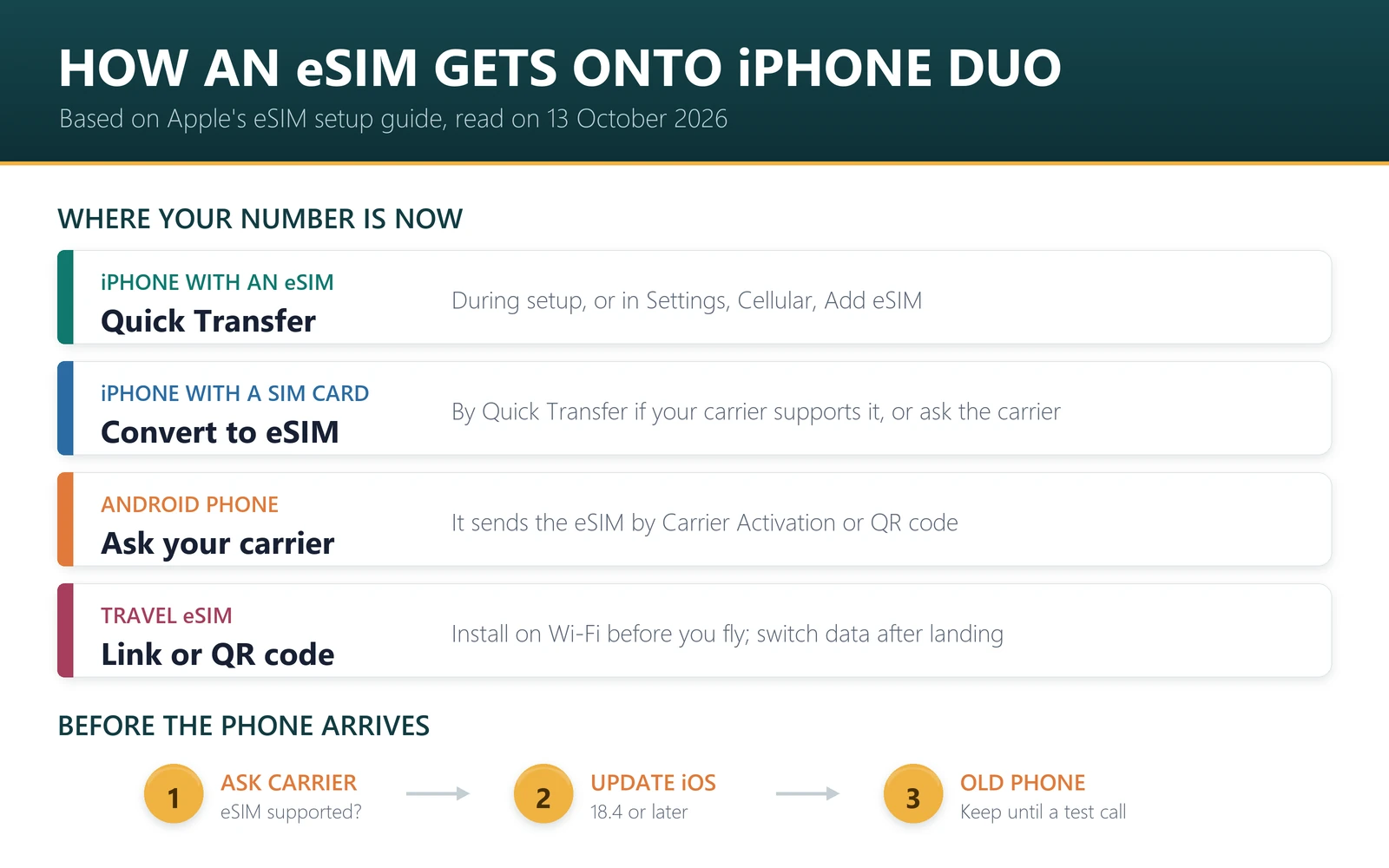
| Where your number is now | How it gets onto iPhone Duo |
|---|---|
| An iPhone with an eSIM | eSIM Quick Transfer during setup, if your carrier supports it |
| An iPhone with a physical SIM | Quick Transfer where your carrier can convert the SIM to an eSIM; otherwise ask the carrier for an eSIM by QR code, app or in store |
| An Android phone | Ask your carrier, which sends the eSIM by Carrier Activation or QR code. With iOS 26 or later, some carriers and phone makers support a direct transfer |
| A new line bought with the phone | eSIM Carrier Activation: tap the “Carrier Cellular Plan Ready to Be Installed” notification |
| A travel eSIM | QR code, install link or manual entry. Buy it for the Duo, not for the phone you are replacing |
The physical card itself has no role on this phone. What moves is the number, and only your carrier can turn it into an eSIM.
Before your iPhone Duo arrives
- Ask your carrier two questions. Does it support eSIM, and does it support eSIM Quick Transfer? Apple says eSIM is supported by more than 500 carriers worldwide, which is not every carrier.
- Update the old iPhone. Quick Transfer needs iOS 18.4 or later on both phones, the same Apple Account on both, Bluetooth on, and the old phone’s passcode.
- Back up the old phone and keep it. Do not erase it or trade it in until the Duo has made a test call on your number.
- List the eSIMs already on the old phone. A travel eSIM with data left on it normally cannot be moved; most install once. Our eSIM transfer guide has a table for each case.
- Check the Duo is unlocked if a carrier sold it to you. In Settings, General, About, the line Carrier Lock should read “No SIM restrictions”. A locked phone will refuse a travel eSIM from another provider.
Move your number to iPhone Duo
These are the steps in Apple’s eSIM setup guide for iPhone, published on 17 September 2026. The simplest moment is during setup: when the new iPhone asks whether to transfer your phone number, follow the prompts. With iOS 26 or later you can transfer more than one number at that stage. If you skipped it:
- On the Duo, open Settings and tap Cellular.
- Tap Set Up Cellular or Add eSIM.
- Choose the number to transfer. If no list appears, tap Transfer From Nearby iPhone.
- On the old iPhone, tap Transfer, or enter the verification code the new phone shows.
- Wait for the line to activate, then make a test call.
If a banner says “Finish Setting Up Your Carrier’s Cellular Plan”, tap it to complete the transfer on your carrier’s website. If Quick Transfer is not offered at all, your carrier does not support it and will issue the eSIM another way: its app, a link, a QR code or a store visit.
One new option is worth knowing about. iOS 27 adds iPhone Handoff, which lets you switch between two iPhones with the same number. Apple says it is available at launch with T-Mobile in the US and Telekom in Germany, so for most people the normal transfer is still the route.
Add a travel eSIM to iPhone Duo
A travel eSIM is a second line that carries data while your home number stays on for calls and codes. It does not come through Quick Transfer; it comes from the travel provider. Our delivery email arrives a minute or two after payment with a QR code, the manual details and an install link. On the Duo there are three ways to use it, and two of them need no second screen.
- Tap the install link. Open the email on the Duo, tap the install link and then Install on iPhone. Apple supports link-based installs on iOS 17.4 or later: tap Allow on the Activate New eSIM notification, then Continue.
- Use the QR code. With the code on another screen, point the Camera at it and tap Cellular Plan Detected. With the code on the Duo itself, tap and hold the QR code in the email and choose Add eSIM.
- Enter the details manually. In Settings, Cellular, tap Add Cellular Plan, then Enter Details Manually, and paste the SM-DP+ address and activation code from the email.
Do this on Wi-Fi before you fly. Each of our QR codes installs once, so install it on the Duo and not on the old phone “to test”. When the phone asks, label the new line with the country, keep your home number as the default for calls, and leave cellular data on the home line until you land.
After landing, two settings bring the plan to life: choose the travel eSIM under Cellular Data, and turn on Data Roaming for that line only. Our guide to running two lines on iPhone Duo covers the rest, including the setting that can quietly move data back to your home line.
Travel eSIM plans for iPhone Duo owners
There is no Duo-specific plan. A travel eSIM needs an unlocked phone that supports eSIM, and the Duo is eSIM-only by design. These are plans from our catalogue on 13 October 2026, in US dollars, for the trips people most often take. All but the last start counting on first data use, so you can install them as soon as the phone is set up.
| Destination | Plan | Price | Data exits in | Top-up | Starts |
|---|---|---|---|---|---|
| Japan | 10 GB for 30 days | $7.00 | Japan | No | First data use |
| South Korea | 10 GB for 30 days | $7.20 | Hong Kong | Yes | First data use |
| Japan and South Korea | 10 GB for 30 days, both countries | $9.00 | Hong Kong | Yes | First data use |
| Thailand | 10 GB for 30 days | $7.00 | Indonesia | Yes | First data use |
| China | 10 GB for 30 days | $8.00 | Singapore or Hong Kong | Yes | First data use |
| Hong Kong | 10 GB for 30 days | $7.00 | Indonesia | Yes | First data use |
| Europe, multi-country | 10 GB for 30 days | $7.54 | UK | Yes | First data use |
| USA | 10 GB for 30 days | $9.00 | USA | Yes | First data use |
| Turkey | 10 GB for 30 days | $6.45 | Poland | Yes | First data use |
| Australia | 10 GB for 30 days | $7.25 | Singapore | No | First data use |
| Several regions in one trip | Half Global, 12 GB for 30 days | $11.40 | Hong Kong | Yes | When installed |
The Half Global plan is the exception to watch: it starts when the eSIM is installed, not when you first use data, so install it on the day you travel. Across our catalogue, 1,065 of 1,112 plans start on first data use and 38 start on install; the plan page states which under Activation policy. Our guide on when an eSIM starts counting explains the difference.
For a single day or a stopover, day passes start at $1.99 for 1 GB in Japan, with the same price in the UK. If you want more room for video on the 7.6-inch display, 20 GB for Europe costs $13.03 and 20 GB for the USA costs $15.60.
If you need a local phone number
On a phone with a tray, a local SIM from an airport kiosk was the usual way to get a local number. iPhone Duo cannot take one. Most travel eSIMs are data-only, and 13 of the 1,112 plans we sell include a number:
- UK: 10 GB with a UK number and 200 minutes for 30 days, $14.05. See UK eSIMs with a phone number.
- USA: 1 GB with a +1 number, 10 minutes and 10 texts for 7 days, $4.80. See USA eSIMs with a phone number.
- Europe: 50 GB with a French number and unlimited calls within 34 countries, $30.99.
Elsewhere, calls go through apps over the data plan, and your home number stays active on the second line for verification codes.
If the eSIM will not install or connect
- It will not download. Installing needs an internet connection. Apple says eSIM-only models can activate without Wi-Fi in some countries and regions, but do not count on it for a travel eSIM.
- “Unable to add” or a similar error. The usual causes are a carrier-locked phone, a QR code that has already been used, or a stray space in a manually pasted code. Our guide to eSIM error messages decodes the wording.
- Installed, but no data abroad. Check that the travel line is selected for cellular data and that Data Roaming is on for that line. The eSIM diagnostic page reads your plan’s settings from your order number.
Versions sold in mainland China and Hong Kong
The Duo is eSIM-only everywhere, but the rules around eSIM are not the same everywhere. The mainland China version stores two eSIMs, not eight or more, and its carrier setup follows mainland rules. If you are buying there or in Hong Kong, read iPhone Duo in China and Hong Kong first, and use the model numbers guide to check which version you have.
Sources, and what we cannot tell you
The SIM specification is from Apple’s iPhone Duo technical specifications, and the dates, the 500-carrier figure and iPhone Handoff are from Apple’s announcement of 9 September 2026, all read on 13 October 2026. The setup steps are from Apple’s eSIM setup guide for iPhone, published on 17 September 2026. That guide does not mention iPhone Duo by name, and the phone is not on sale yet. We have not handled one, so menu wording on the Duo may differ slightly from the steps above.
Plan details and prices are from our own catalogue on 13 October 2026; product pages are authoritative. Whether your carrier supports eSIM, Quick Transfer or iPhone Handoff is your carrier’s decision, not Apple’s and not ours. For what eSIM-only means on a trip, see iPhone Duo is eSIM-only.
Frequently asked questions
How do I set up an eSIM on iPhone Duo?
During setup, follow the prompt to transfer your number from your old iPhone. Later, open Settings, Cellular, then Set Up Cellular or Add eSIM. Your carrier can also send an eSIM directly, and a travel eSIM installs from a QR code or link. You need Wi-Fi or a hotspot.
Can I put my SIM card in iPhone Duo?
No. iPhone Duo has no SIM tray in any country, and Apple’s specifications say it is not compatible with physical SIM cards. Your number can still move: with eSIM Quick Transfer where your carrier can convert the SIM, or with an eSIM issued by the carrier.
How do I add a travel eSIM to iPhone Duo?
Open the provider’s email on the Duo and tap the install link, or tap and hold the QR code and choose Add eSIM. From another screen, scan the code with the Camera. Manual entry is under Settings, Cellular, Add Cellular Plan. Install on Wi-Fi before you fly.
Do I need Wi-Fi to set up an eSIM on iPhone Duo?
Plan on it. Apple’s setup guide says to connect to Wi-Fi or a hotspot, and adds that eSIM-only models can activate without Wi-Fi in some countries and regions. A travel eSIM profile downloads over the internet, so install it at home, not at the arrival gate.
When should I buy a travel eSIM for a new iPhone Duo?
After the phone arrives, and install it on the Duo. Most travel eSIM QR codes install once, so one installed on the old phone stays there. In our catalogue on 13 October 2026, 1,065 of 1,112 plans start on first data use, so installing early does not cost days.
How many eSIMs can iPhone Duo have?
Apple’s specifications list two active eSIMs and storage for eight or more. Two lines can be on at once, usually your home number and a travel plan, with only one carrying data at a time. The mainland China version stores two.
Which travel eSIM works with iPhone Duo?
Any travel eSIM for an unlocked, eSIM-capable iPhone; there is no Duo-specific plan. On 13 October 2026 our 10 GB plans for 30 days cost $7.00 for Japan, $7.54 for Europe and $9.00 for the USA. We have not tested an iPhone Duo yet, because it is not on sale.
The work with iPhone Duo is at the start: get your number onto an eSIM, confirm it with a test call, and only then let go of the old phone. After that, adding a travel eSIM is a two-minute job, and with eight or more profiles stored you can load the next trip before you finish this one.
Last reviewed 13 October 2026. iPhone Duo specifications, dates and setup steps are from Apple’s technical specifications, its announcement of 9 September 2026 and its eSIM setup guide published on 17 September 2026, read on that date; Apple may change them, and availability varies by country. Plan details and prices are from our own catalogue on the same date; product pages are authoritative. We have not handled an iPhone Duo. iPhone, iOS and Apple are trademarks of Apple Inc.; T-Mobile and Telekom are trademarks of their owners. This article is independent and not affiliated with them. The price of our USA 20 GB plan was updated to $15.60 on 26 October 2026.