
Yes, Apple Intelligence keeps working when you travel. Apple’s support page for iOS 27 says it “will continue to work when you travel to other regions around the world”, and Apple says the same of Siri AI once it is turned on. But the rules are set by three things a trip does not change: where your iPhone was bought, your Apple Account region, and, in China mainland, where you are.
The two big exceptions: Apple says Siri AI “is not available for iOS, iPadOS, or watchOS in the EU”, and Apple Intelligence “will not currently work for supported devices purchased in China mainland”. Everything else in this guide follows from those sentences. iOS 27 was released on 14 September 2026.
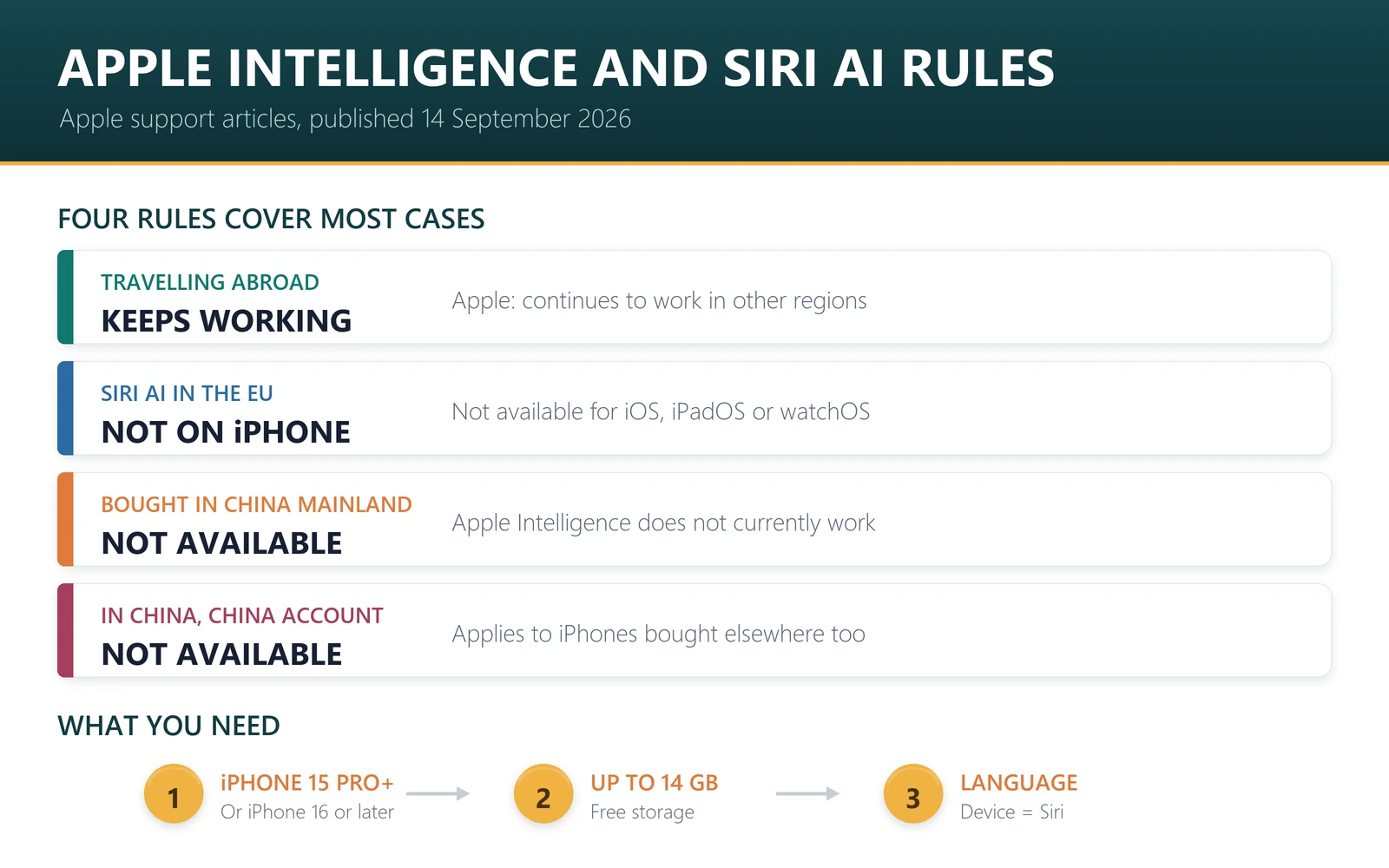
- Travelling: Apple Intelligence continues to work abroad; Siri AI continues to work after you turn it on.
- EU residents: Apple Intelligence features across apps are available; Siri AI is not available on iPhone.
- Bought in China mainland: Apple Intelligence does not currently work.
- Bought elsewhere, used in China: it does not work only if your Apple Account region is also China mainland.
- Language: Siri AI is English-only for now, and needs your device and Siri languages to match.
The rules, in Apple’s own words
All quotations come from Apple’s support articles on getting Apple Intelligence and getting Siri AI, both published on 14 September 2026.
| Situation | Apple Intelligence | Siri AI (Beta) |
|---|---|---|
| Travelling to another region | “Will continue to work when you travel to other regions around the world” | “After you turn on Siri AI, it will continue to work when you travel to other regions” |
| EU residents | Features across apps “are available for users based in the EU” on iOS 27 | “Not available for iOS, iPadOS, or watchOS in the EU”; available on macOS 27 and visionOS 27 with an EU Apple Account in English |
| Device bought in China mainland | “Will not currently work” | Not addressed separately; Siri AI is powered by Apple Intelligence |
| Device bought elsewhere, in China mainland | Does not currently work “if you are in China mainland and if your Apple Account Country or Region is also in China mainland” | “Will not currently work if your Apple Account region is in mainland China” |
| Languages | 16 supported languages, with feature-by-feature variation | “Currently available in English” |
Apple’s iOS feature availability page summarises Siri AI in one line: “Available in English – Not available in the China mainland and the European Union”. Several Apple Intelligence features carry a similar note on Chinese (Simplified): “not available in China mainland”.
Will it work for you? Common travel scenarios
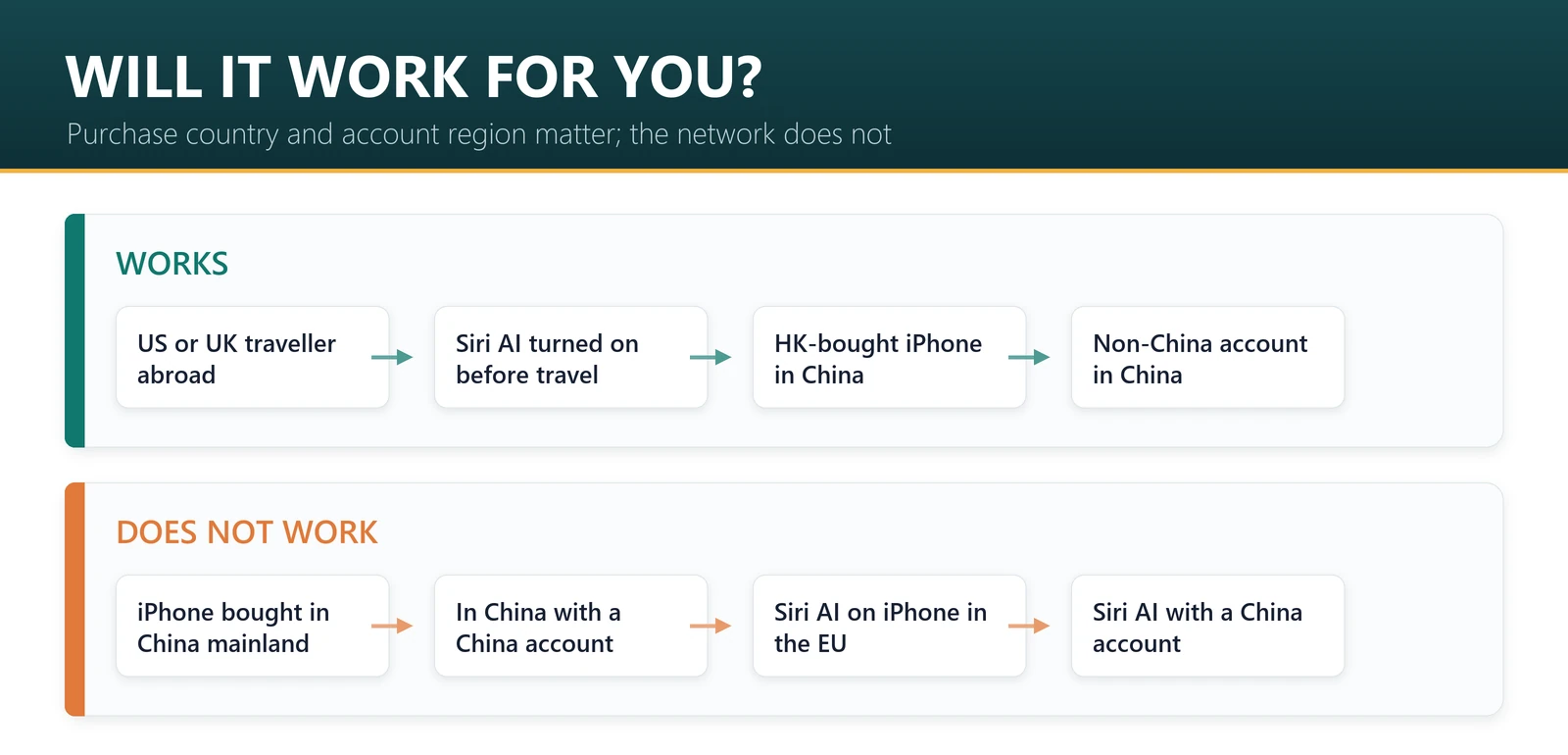
Applying Apple’s wording to the situations we get asked about most. Where Apple’s documentation does not cover a case, we say so rather than guess.
| Your situation | Apple Intelligence | Siri AI | Why |
|---|---|---|---|
| US account and US iPhone, visiting Europe | Works | Works if already turned on | Both continue when travelling |
| UK account, visiting the US | Works | Works if already turned on | The UK is not in the EU |
| EU account, iPhone, at home | Works | Not available | Siri AI is not available for iOS in the EU |
| EU account, iPhone, visiting the US | Works | Apple does not say travel makes it available | Siri AI eligibility is tied to Apple Account region |
| Hong Kong-bought iPhone, Hong Kong account, visiting China mainland | Works | Not blocked by the China rule | Not bought in China mainland; account not in China mainland |
| US iPhone with a China mainland account, in China mainland | Does not currently work | Does not currently work | Both China conditions are met |
| US iPhone with a China mainland account, visiting Japan | Not blocked by the China rule | Does not currently work | The Apple Intelligence rule needs both location and account; Siri AI’s needs only the account |
| iPhone bought in China mainland, anywhere | Does not currently work | Not usable, as it runs on Apple Intelligence | Purchase country rule has no travel exception |
The last row surprises people most. Apple’s purchase-country rule for China mainland makes no exception for travel, so a mainland iPhone taken abroad does not start using Apple Intelligence. The same purchase-country logic appears in other Apple rules: satellite features, for instance, are not offered on iPhones bought in China mainland. Our guides to mainland vs Hong Kong iPhone Duo and iPhone 18 Pro model numbers explain how to tell which version you have.
Heading abroad with iOS 27? Your AI features follow your account; your data connection follows your plan. Browse travel eSIM plans, or go straight to Europe, the US or Japan.
What a travel eSIM does and does not change
A question we see often after iOS updates: does changing your mobile network change what Apple features you get? Going by Apple’s rules, no. Apple ties Apple Intelligence and Siri AI to where the device was purchased, your Apple Account region, and, for China mainland, your location. A travel eSIM changes the mobile network your phone uses. It does not change where the iPhone was bought, which region your Apple Account is set to, or where you are standing.
So a travel eSIM is not a way to get Siri AI in the EU or Apple Intelligence on a mainland iPhone, and we would not present it as one. What it does do is keep the features that already work for you online while abroad, because features that use Private Cloud Compute, Siri AI’s answers from the web and ChatGPT integration all need an internet connection. Where your traffic exits to the internet is a separate question, covered in does a travel eSIM change your IP address.
Which iPhones get Apple Intelligence and Siri AI
Apple lists the same iPhones for both: iPhone 15 Pro, iPhone 15 Pro Max, iPhone Air and “iPhone 16 models or later”, which includes iPhone 18 Pro, 18 Pro Max and iPhone Duo. Other requirements from Apple’s articles:
- Software: iOS 27.
- Storage: up to 14 GB on iPhone 17 Pro, 17 Pro Max and iPhone Air, and up to 8 GB on other supported iPhones.
- Language: device language and Siri language set to the same supported language.
- Siri AI: an Apple Account in an eligible region, and a waitlist after you tap Try Siri AI (Beta) in Settings, Siri.
- Usage limits: Apple says features that rely on server-side models, including Siri AI, are subject to daily limits, and that expanded access will be available for a fee in the future.
Two practical points before a trip. Update and download the models on Wi-Fi at home, because up to 14 GB is a lot of travel data. And if you plan to turn on Siri AI, do it before you go: Apple says it continues to work when you travel after it is turned on. Our iOS 27 travel guide covers the rest of the update.
Languages: the rule people forget
Apple’s announcement lists 16 languages for Apple Intelligence, but not every feature supports every language, and Apple lists them feature by feature. Examples from Apple’s feature availability page on 15 September 2026:
| Feature | Languages Apple lists |
|---|---|
| Siri AI | English only; not in China mainland or the EU |
| Siri AI Expressive Voices | English (UK) and English (US) |
| Order Tracking in Wallet | English (UK) and English (US) |
| Workout Buddy | English variants and Spanish variants only |
| Safari Notify Me, Suggested Reminders | 35 language variants; Chinese (Simplified) not available in China mainland |
If you switch your iPhone’s language to match a country you are visiting, Apple notes Apple Intelligence “might become unavailable until the new Siri language fully downloads and matches the device language”. Change languages at home on Wi-Fi, not on arrival.
Sources, and what this cannot tell you
Rules and quotations are from Apple’s support articles on Apple Intelligence and Siri AI (both 14 September 2026) and Apple’s iOS feature availability page, read on 15 September 2026. The scenario table applies Apple’s published wording; where a case is not covered, we say so.
Apple does not publish how it determines location or residency, and we do not speculate about it. Siri AI is in beta and availability is changing quickly: Apple says Siri AI support for French, Japanese, Korean, Portuguese and Spanish arrives in October. We have not tested these features in any country.
Frequently asked questions
Does Apple Intelligence work when I travel abroad?
Yes. Apple’s iOS 27 support article says Apple Intelligence will continue to work when you travel to other regions around the world. Feature availability still depends on your device language, and the China mainland rules apply based on where the iPhone was bought and your Apple Account region.
Is Siri AI available in the EU?
Not on iPhone. Apple says Siri AI is not available for iOS, iPadOS or watchOS in the EU. It is available on macOS 27 and visionOS 27 if your Apple Account region is in the EU and your device and Siri languages are both set to English.
Can I use Siri AI if I travel to Europe from the US?
Yes, if you have already turned it on. Apple says that after you turn on Siri AI, it will continue to work when you travel to other regions. Turn it on before you leave, because it starts with a waitlist and a download.
Does Apple Intelligence work on an iPhone bought in China?
Not currently. Apple says Apple Intelligence features will not currently work for supported devices purchased in China mainland. Apple’s wording makes no exception for travel, so taking a mainland iPhone abroad does not change this.
Does Apple Intelligence work in China on an iPhone bought elsewhere?
It depends on your Apple Account. Apple says features will not currently work if you are in China mainland and your Apple Account Country or Region is also China mainland. With an account set to another region, that rule does not apply.
Does Apple Intelligence work on a Hong Kong iPhone?
Apple’s China restriction refers to devices purchased in China mainland, and Hong Kong is a separate purchase region. A Hong Kong iPhone with a Hong Kong Apple Account is not covered by either China rule, including when visiting the mainland.
Which iPhones support Apple Intelligence in iOS 27?
Apple lists iPhone 15 Pro, iPhone 15 Pro Max, iPhone Air and iPhone 16 models or later, which includes iPhone 18 Pro and iPhone Duo. You need iOS 27, up to 14 GB or 8 GB of storage depending on model, and matching device and Siri languages.
Will a travel eSIM let me use Siri AI where it is not available?
No. Apple ties Siri AI to your Apple Account region and Apple Intelligence to purchase country and, for China, your location and account. A travel eSIM changes your mobile network, not any of those, so it is not a way around Apple’s rules.
Bottom line
For most travellers, Apple Intelligence simply comes with you: Apple says it keeps working abroad, and Siri AI does too once it is on. The rules bite in two places. If you live in the EU, Siri AI is not on your iPhone. If your iPhone was bought in China mainland, Apple Intelligence is not currently available at all, wherever you take it. Turn features on and download the models at home, then travel with whatever network you like.
Last reviewed 15 September 2026. Rules and requirements are quoted from Apple’s support articles and iOS feature availability page, read on that date; Siri AI is in beta and availability may change. Apple, iPhone, Apple Intelligence and Siri are trademarks of Apple Inc.; this article is independent editorial commentary and is not affiliated with, sponsored by or endorsed by Apple. Illustrations are our own.