
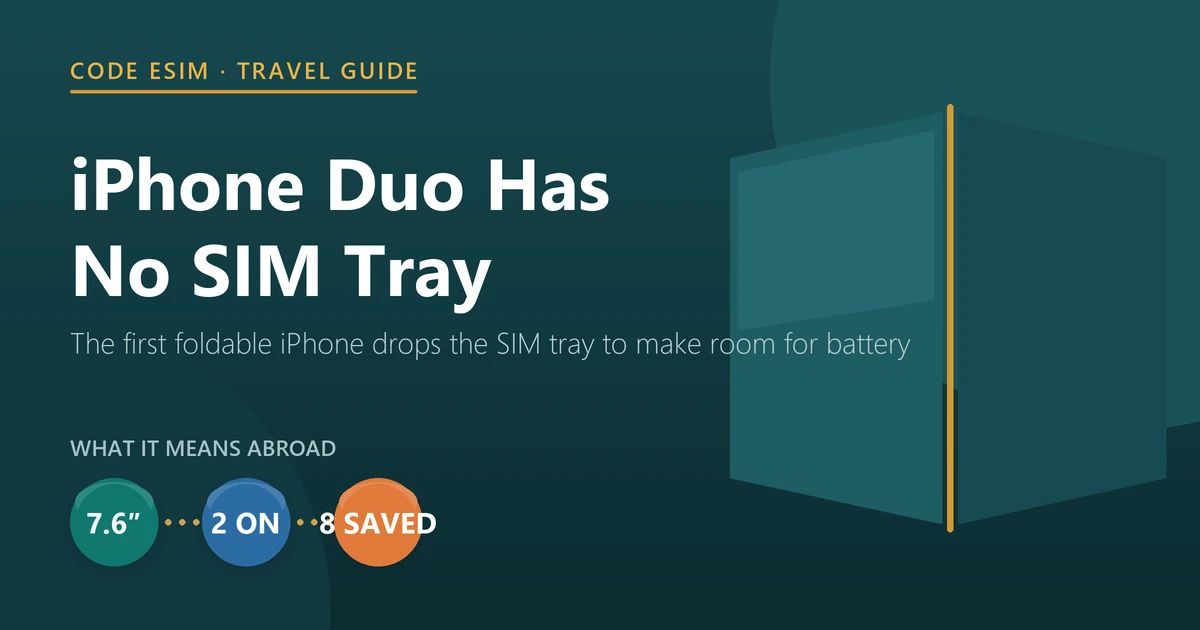
Buried in Apple’s marketing copy for its first foldable is the sentence that explains the whole design: “An iPhone-first dual-battery system, along with an internal space-saving eSIM design, maximizes physical space for battery capacity.”
Read that again, because it inverts the usual story. The missing SIM tray on iPhone Duo is not a feature Apple bolted on to push people towards eSIM. It is a structural decision — in a phone that measures 5.2 mm when open, the tray and its housing were competing directly with the cells. Apple traded the slot for battery, and quotes up to 31 hours of video playback on the inner display as what it bought.
The consequence for anyone who travels is absolute and worth being clear about: iPhone Duo cannot take a physical SIM card anywhere in the world. Apple’s technical specifications state it flatly — the phone is “not compatible with physical SIM cards”. Not eSIM-preferred, not eSIM-only-in-the-US the way iPhone 14 was. There is no tray to open.
Pre-orders open at 5:00 a.m. PT on 16 October 2026, with availability from 23 October, from US$1,999. This guide covers the specifications that matter once you leave your home country, what the foldable design genuinely changes on a trip, and the setup that an eSIM-only phone makes non-negotiable.
iPhone Duo specifications that matter abroad
Taken from Apple’s iPhone Duo product page and technical specifications, read on 10 September 2026. We have left out what makes no difference on a trip.
| Specification | iPhone Duo | Why it matters when travelling |
|---|---|---|
| SIM | Dual eSIM — two active, stores eight or more. No physical SIM support | Determines everything below |
| Inner display | 7.6-inch Super Retina XDR folding OLED, 1878×2670 at 430 ppi, 10 ultrathin layers, nano-texture anti-glare, 3000 nits peak — 50% larger than iPhone 18 Pro Max | Maps, boarding passes and split-screen planning at near-tablet size |
| Outer display | 5.4-inch, 1398×2034 at 460 ppi, over 90% of the screen area of iPhone 18 Pro, same aspect ratio as the inner display | Fully usable folded — you are not forced to open it in a crowd |
| Both displays | ProMotion to 120 Hz, Always-On, Dynamic Island, HDR, True Tone, P3 | — |
| Chip | A20 Pro with vapor-chamber cooling; up to 20% faster 6-core CPU and 50% more memory bandwidth than A19 Pro; Dual 16-core Neural Engine | On-device translation and maps stay fast offline |
| Battery | Dual-battery system; up to 24 h typical use; 44 h video on the outer display, 31 h on the inner; 50% in ~20 min at 60 W+ | Long-haul flights and 14-hour airport days |
| Cellular | Apple C2 modem, 5G sub-6 GHz and mmWave, 4×4 MIMO, Gigabit LTE, extensive global band support | Wide band coverage for roaming on partner networks |
| Cameras | 48MP Fusion Main (26 mm, ƒ/1.6) with 2x optical-quality tele, 48MP Fusion Ultra Wide (13 mm, 120°), 12MP Center Stage front, under-display FaceTime camera; 4K Dolby Vision to 120 fps | One device instead of a camera bag |
| Durability | Grade 5 titanium frame and hinge cover, scratch-resistant inner-display coating, Ceramic Shield front and back, IP68 to 6 m for 30 min | Rain, pools, sand, dust |
| Size and weight | 5.2 mm open, 11.3 mm closed; 254 g | Heavier than a standard iPhone — noticeable in a jacket pocket |
| Other | Touch ID; USB-C with DisplayPort and USB 3; MagSafe and Qi2 to 25 W; iOS 27; 256 GB–2 TB; Night Sky, Star White | Touch ID works with wet hands and in bright sun |
What a foldable actually changes on a trip
Apple describes iPhone Duo as “posable”, and lists five configurations: landscape, portrait, closed, seated and standing. That reads like marketing until you map it onto what people actually do with a phone in an unfamiliar city, where it turns out to be the most travel-relevant thing about the device.
- Closed, one-handed. Apple moved essential controls to the side and the outer display carries more than 90% of the screen area of an iPhone 18 Pro. Walking through a crowded station checking directions is exactly when you do not want to unfold a $1,999 phone.
- Open, landscape, Split View. Two apps side by side: the map on one half, the booking confirmation or translation on the other. This is the single most useful thing a large folding screen does for a traveller, and it is the thing a normal phone cannot do at all.
- Open, portrait. A wider keyboard for writing a real message, and the ability to pin a video to the top while using another app.
- Seated. Set it down at an angle on a tray table and watch something without holding it for eleven hours.
- Standing, hands-free FaceTime. It stands on its own, so calling home from a hotel room does not mean propping the phone against a water glass.
The camera features follow the same pattern — Duo Preview shows the person you are photographing a live preview on the outer display, and Duo FaceTime lets people beside you join a call on the outer screen. Both are the kind of thing that only exists because there are two screens facing opposite directions.
None of this changes your connectivity. But it changes how much you will lean on the phone, which is a data question, and we will come back to it.
Dual eSIM: two active, eight or more stored
Storing a profile and having it active are different things, and the difference is the practical core of travelling with this phone.
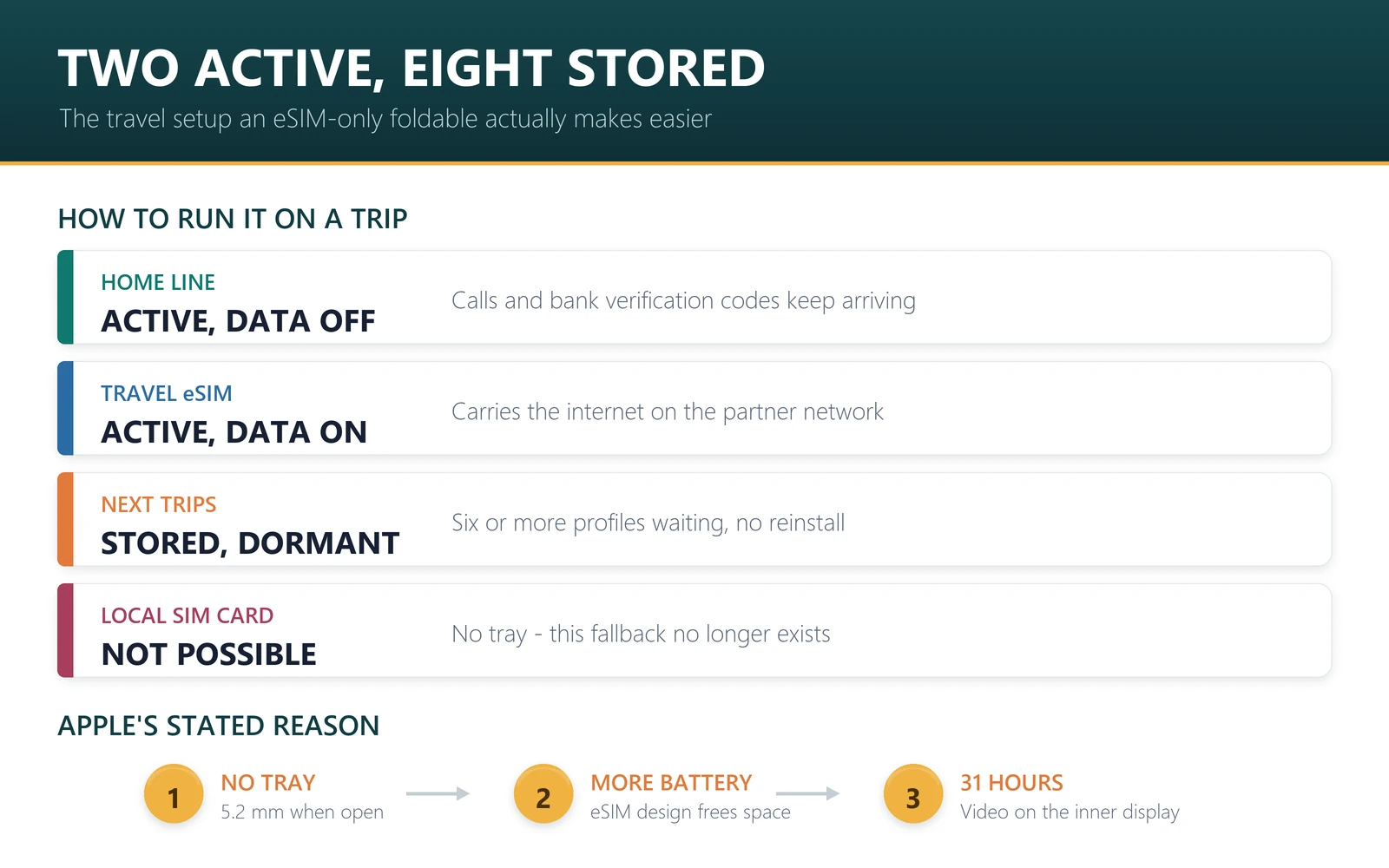
Two active means two lines can be switched on and registered at the same time. That supports the setup most travellers actually want: your home number stays live for calls and the bank verification codes that always arrive at the worst moment, while a travel data plan carries the internet. You are not choosing between being reachable and being online.
Eight or more stored means several trips can be loaded in advance and switched between without reinstalling anything. Install Japan in September, Europe in November, keep both, activate whichever you are flying to. On a phone with a tray you would be carrying a wallet of plastic and a paperclip; here it is a toggle in Settings.
The real change: no local SIM, ever
On any iPhone with a tray, a fallback has always existed. If a travel plan disappointed you, if you needed a local number for a delivery app, or if your data ran out at 11pm, you could find a shop and buy a local SIM. On iPhone Duo that option does not exist — not “is inconvenient”, is not available.
For most trips this costs nothing, because a travel eSIM does the same job and does it before you land rather than after. But it removes two things worth naming plainly.
The local phone number. We counted our own catalogue for a separate piece and the picture is stark: of 827 travel eSIM plans on sale, 12 include voice and 6 include SMS — roughly 1.5% of the range. Travel eSIMs are data products. If your trip needs a domestic number for a ride-hailing signup, a parcel locker or a booking system that texts a code, a local SIM used to be the reliable answer and on this phone it is off the table. Some operators sell local eSIMs to visitors, but that varies by market and by month, so check for your destination rather than assume.
The rescue path when the handset fails. A plastic SIM moves into a borrowed phone in seconds. An eSIM profile normally cannot: travel eSIM QR codes are usually single-install, which we state in our own delivery emails. With no tray, iPhone Duo removes the plastic fallback for the travel plan and the home line at once. If you are travelling remote or alone, that is an argument for carrying a cheap spare handset — not for avoiding the Duo, but it is a real change and neither Apple nor we have much incentive to raise it.
Will an eSIM-only phone actually work where you are going?
The usual worry about an eSIM-only device is being stranded somewhere that “does not support eSIM”. The constraint is narrower than that, because a travel eSIM does not need the local operator to sell eSIMs to the public — it needs a wholesale roaming agreement, which is a different and much older arrangement.
For scale, across the 829 plans in our own catalogue there are named partner networks in 190 countries and territories, and 508 plans name more than one carrier, so the phone has somewhere to fall back to when one network is weak. For most itineraries, that is the answer.
What it does not settle is which network you land on, and that is the specification worth reading before buying any plan. It is fixed by the plan, not chosen by you, and the operator with the best rural coverage is frequently carried by the fewest plans — Telstra appears on 11 of our Australian plans against 50 for Optus. If your route leaves the cities, pick the plan by its partner network rather than its price. We mapped this across 20 destinations in which network your travel eSIM actually uses.
One more thing the bigger screen changes: you will use more data. A 7.6-inch display invites map-scrolling, split-screen browsing and video in a way a 6-inch phone does not, and 44 hours of battery removes the usual brake on doing it. If you normally buy 5 GB for a week, budget higher on this phone — our data usage guide has per-app numbers to size it properly.
The setup, in order
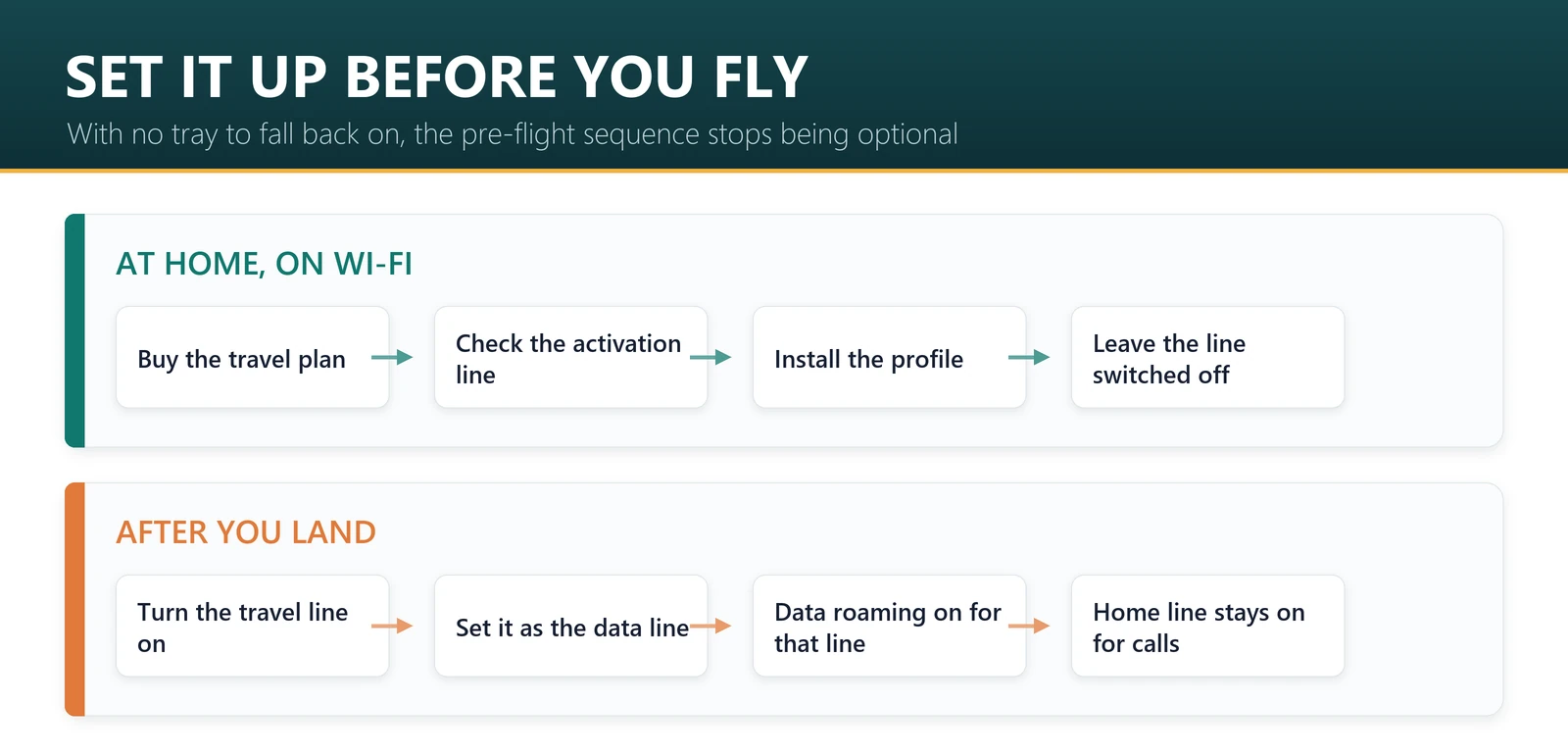
On a phone with a SIM tray, a sloppy setup is recoverable at the airport. On this one it is not, so the sequence matters more than it used to.
- Buy and install the travel eSIM at home, on Wi-Fi. Installing a profile needs an internet connection — precisely what you will not have on arrival. This is the highest-value habit for a Duo owner.
- Read the activation line before you install. Most plans start counting on first data use, so installing early is free. Not all do: in our range 37 of 827 plans start the clock at installation, clustered among the longest-validity plans. See when an eSIM starts counting.
- Leave the travel line switched off until you land. Installing and enabling are different actions, and only enabling can start a clock or register on a network.
- Keep your home line active with its data roaming off. Calls and verification texts keep arriving on your own number; no data goes through it.
- After landing, set the travel eSIM as the data line and turn data roaming on for that line only. This is what authorises it to use the partner network, and it is not the same setting as roaming on your home plan.
- Check top-up support before you need it. 614 of our 827 plans can be topped up; the largest plans are the least likely to.
If nothing connects after landing, it is almost never a broken eSIM — work through the troubleshooting checklist before buying a second plan.
Sources, and what this article cannot tell you
Every iPhone Duo specification, price and date above is from Apple’s iPhone Duo product page and technical specifications, read on 10 September 2026, ahead of the 16 October pre-order. Pricing is Apple’s US starting price; dates and prices vary by country and Apple may change them.
The travel eSIM figures — 827 plans, 190 countries with named partner networks, 12 plans with voice, 614 with top-up, 37 activating at install — are our own counts from the Code eSIM catalogue in August 2026, each with its method set out in the linked articles. Our catalogue syncs daily, so the product page is always more current than any article.
Two things we are not positioned to tell you. We have not handled an iPhone Duo — nothing here is a hands-on review, and any judgement about the hinge, the crease or how the folding display ages belongs to people who have used one. And whether a specific country’s operators sell eSIMs to visitors changes by market and by month; check current local sources for your destination rather than any retailer’s summary, ours included.
Frequently asked questions
Does iPhone Duo have a SIM card slot?
No. Apple’s technical specifications state that iPhone Duo uses eSIM and is “not compatible with physical SIM cards”. There is no SIM tray in any region, so every line on the phone — home and travel — has to be an eSIM.
How many eSIMs can iPhone Duo hold?
It stores eight or more eSIM profiles and can have two active at the same time. In practice your home number and a travel data plan can both be live, with several more trips’ profiles installed and waiting.
Can I use a travel eSIM on iPhone Duo?
Yes, and it is the intended way to get data abroad on this phone. Buy and install the profile on Wi-Fi before you fly, leave the line switched off until you land, then set it as your data line and enable data roaming for that line.
What if I need a local SIM abroad?
You cannot use one — there is no tray. Some countries’ operators sell eSIMs to visitors, worth checking before you travel if you specifically need a local number. Otherwise a travel eSIM covers data and your home line stays active for calls and verification codes.
Does an eSIM-only phone work in most countries?
For data, generally yes. A travel eSIM roams onto local partner networks under wholesale agreements rather than needing the local operator to sell eSIMs retail. Our catalogue names partner networks in 190 countries and territories, and 508 of 829 plans name more than one carrier, so the phone has a fallback.
Will a travel eSIM give me a phone number on iPhone Duo?
Almost certainly not. Travel eSIMs are data-only: 12 of the 827 plans in our catalogue include voice and 6 include SMS. Keep your home line active for calls and texts and use internet-based messaging for the rest.
How much data does iPhone Duo use compared with a normal iPhone?
Expect more. A 7.6-inch display and 44 hours of battery encourage map-scrolling, split-screen browsing and video that a smaller phone discourages. If 5 GB covered a week on your old iPhone, size up rather than assuming the same plan will do.
When can I buy iPhone Duo and what does it cost?
Pre-orders open at 5:00 a.m. PT on 16 October 2026 and it is available from 23 October, starting at US$1,999 for 256 GB, in Night Sky and Star White, with storage to 2 TB. Prices and dates vary by country.
Why did Apple remove the SIM tray on a foldable?
Battery. Apple’s own wording is that “an iPhone-first dual-battery system, along with an internal space-saving eSIM design, maximizes physical space for battery capacity”. In a body 5.2 mm thick when open, the tray competes with the cells, and Apple quotes up to 31 hours of video playback on the inner display as the result.
Bottom line
iPhone Duo makes the eSIM decision for you, and mostly in travellers’ favour. Two active lines mean your home number and travel data coexist without a tray. Eight stored profiles mean several trips can be loaded in advance. Split View on a 7.6-inch screen makes it the first iPhone where a map and a booking can genuinely sit side by side. What it removes is the fallback: no local SIM for a local number, and no plastic to move into a borrowed phone if the handset dies. Plan for the first by checking whether you actually need a local number, and for the second by setting everything up at home, on Wi-Fi, before you leave — and buy more data than you would for a smaller phone, because you are going to use it.
Getting a Duo before a trip? Start with the destination: all 191 destinations, or Japan, Europe, USA and Thailand. Then read how to keep your home number on the second line, when a plan starts counting and what changes without a physical SIM.
Last reviewed 10 September 2026. iPhone Duo specifications, pricing and availability are from Apple’s official product and technical specification pages, read on that date and subject to change. Apple, iPhone and iPhone Duo are trademarks of Apple Inc.; this article is independent editorial commentary and is not affiliated with, sponsored by or endorsed by Apple. Illustrations are our own. Travel eSIM figures are counts from the Code eSIM catalogue in August 2026, with methods given in the linked articles.