
A travel eSIM cannot bill you. Your home operator can — and it will, if your own line is left able to use data abroad. The two lines are independent, and the charges people blame on travel eSIMs almost always come from the line they forgot to switch off.
This is the fear that stops a lot of people buying one at all, so it is worth answering precisely rather than reassuringly. There is one setting that genuinely catches people out, and it is not the obvious one.
How a dual-SIM phone actually bills you
Modern phones run two lines at once: your physical SIM or primary eSIM, and the travel eSIM. Each line has its own independent settings for whether it may use data, and whether it may do so while roaming.
Money only moves in one direction: your home operator charges you for what your home line does. The travel plan is prepaid — you have already paid for it, it cannot exceed what you bought, and when it runs out it simply stops. There is no bill to arrive later. What can arrive later is your normal monthly bill with roaming charges on it, and that happens because your home line used data abroad.
So the entire question reduces to: what did your home line do while you were away?
The setting that actually catches people out
Most travellers know to turn off data roaming on their home line. Fewer know about the second one.
On iPhone, under Settings → Cellular, there is an option called Allow Cellular Data Switching. When it is on, the phone is permitted to fall back to your other line for data when the line you selected has poor coverage. It is a genuinely useful feature at home. Abroad, it means that every time your travel eSIM has a weak signal — in a lift, on a train, in a basement restaurant — the phone may quietly hand data over to your home line, which is roaming.
Android phones have equivalent behaviour under names like automatic data switching or adaptive connectivity, varying by manufacturer.
Turn it off before you travel. It is the single most common cause of a roaming bill for someone who is certain they did everything right — because they did do the obvious thing, and this one is not obvious.
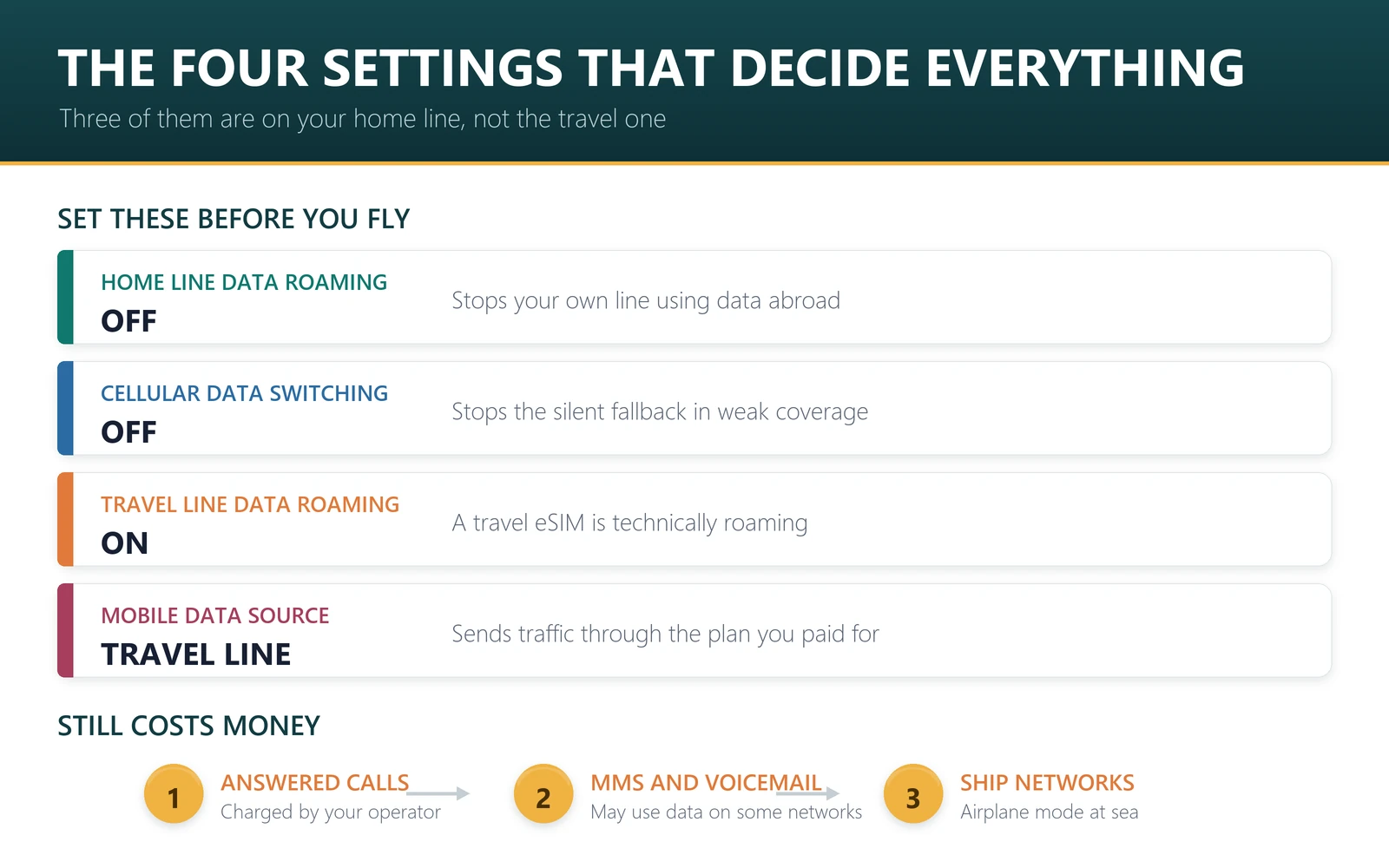
The four settings that decide everything
| Setting | Where | Set it to | Why |
|---|---|---|---|
| Data roaming | Home line | Off | Stops your own line using data abroad at all. |
| Cellular data switching | Phone-wide | Off | Stops the phone silently falling back to the home line in poor coverage. |
| Data roaming | Travel eSIM line | On | A travel eSIM is technically roaming. Without this it will not connect. |
| Mobile data source | Phone-wide | Travel line | Sends all data through the plan you already paid for. |
Notice the third row, because it looks wrong to people who just switched roaming off everywhere. The travel eSIM needs roaming enabled on its own line to work at all. Switching roaming off globally is a common reason a perfectly good eSIM appears dead on arrival — one of the first things our troubleshooter checks.
Your home line stays switched on for calls and texts throughout. That is deliberate and it is the main advantage of this setup: your number keeps working, bank verification codes still arrive, and none of it uses data. The details are in using a travel eSIM while keeping your own number.
What still costs money with data roaming off
Honesty matters more than reassurance here, so: switching data roaming off does not make your home line free.
- Incoming calls answered abroad are often charged by your operator, sometimes at a high rate. Let them go to voicemail if you are unsure.
- Outgoing calls and texts on your home line are charged at international rates.
- Visual voicemail and MMS can use data on some operators even when you think data is off.
- Premium or satellite networks — on cruise ships and some aircraft — bill at rates that bear no relation to normal roaming, and phones connect to them automatically.
The last one deserves emphasis: a phone that connects to a ship’s onboard cellular network can generate charges that dwarf anything on land. Enable airplane mode at sea unless you know what your operator charges. We go through how operators structure these fees in how roaming charges work in 2026.
The 60-second check before you fly
Do this on home Wi-Fi, in this order.
- Install the travel eSIM — see why installing before you fly matters.
- Home line: data roaming off. Keep the line itself on, for calls and texts.
- Cellular data switching: off.
- Travel line: data roaming on.
- Mobile data: set to the travel line.
- Default voice line: leave as your home number, so people can still reach you.
On landing, nothing further is required. If data does not come up within a couple of minutes, toggle airplane mode once, and if it still does not, the travel line’s roaming switch is the first thing to re-check.
What to buy if you are setting this up now
These are prepaid, so the worst case is that you use the data you bought and it stops. There is no bill afterwards. Prices are from our catalogue on 22 September 2026 and move daily — each plan page is the live version.
| Destination | Plan | Price |
|---|---|---|
| Japan | 10 GB / 15 days | $7.40 |
| Europe | 20 GB / 30 days | $13.03 |
| Turkey | 12 GB / 30 days | $8.20 |
| Australia | 10 GB / 30 days | $7.00 |
| Singapore, Malaysia and Thailand | 30 GB / 30 days | $10.90 |
Check your phone is carrier-unlocked and eSIM-capable on our compatibility list first — a locked phone is the other reason a travel eSIM will not connect.
Frequently asked questions
Can a travel eSIM itself charge me extra?
No. Travel eSIM plans are prepaid. You pay once, use what you bought, and it stops when the data or validity runs out. There is no overage bill and no contract. Any roaming charge you receive comes from your home operator, for what your home line did.
Why do I need roaming switched on for the travel eSIM?
Because a travel eSIM is technically roaming on a partner network. That switch applies per line, so enabling it for the travel line while leaving it off for your home line is exactly the right configuration — not a contradiction.
What is cellular data switching and why turn it off?
It lets the phone fall back to your other line for data when the selected line has weak coverage. Abroad, that means your home line can pick up data traffic while roaming, generating charges. Turn it off before you travel.
Will I still receive calls and texts on my own number?
Yes, as long as you leave the home line enabled and set as the default voice line. Calls and texts do not use data, so they work with data roaming off. Incoming calls answered abroad may still be charged by your operator.
Do I need to remove my physical SIM?
No, and you should not. Keeping it in is the whole point — your number stays reachable for verification codes while the travel eSIM carries the data. Just make sure its data roaming is off.
What about cruise ships and planes?
Those use satellite-backed networks billed at exceptional rates, and phones join them automatically. Use airplane mode at sea unless you have specifically checked what your operator charges. No travel eSIM covers maritime networks either.
How do I check nothing went wrong during the trip?
Most operators let you see roaming usage in their app during the trip rather than after the bill. Check once on the first day. If your home line shows zero data used abroad, your settings are correct and will stay correct.
The fear is reasonable and the fix is four switches. Your home line cannot bill you for data it is not allowed to use, and the travel plan cannot bill you at all because you already paid for it. Set it up on the sofa before you fly, check your operator app once on day one, and the question stops being interesting.