
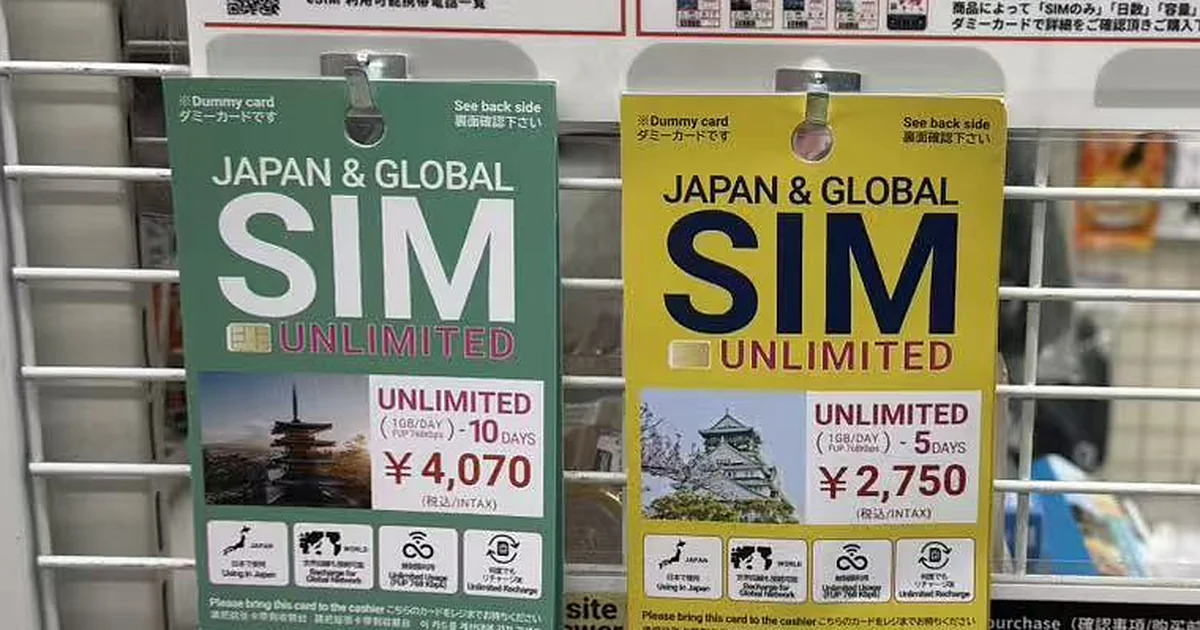
Yes, some convenience stores in Japan sell SIM cards. At the start of November 2026, one of our team photographed a display selling a physical “Japan & Global SIM Unlimited”: 1 GB a day at full speed, then 768 kbps, at ¥2,750 (about $17.42) for 5 days or ¥4,070 (about $25.78) for 10. That is more than three times the price of Code eSIM’s Japan day pass with 1 GB a day on NTT Docomo’s network: $5.30 for 5 days or $7.00 for 10 when we checked on November 3, 2026. The pass slows further after the daily gigabyte, though, to 256 kbps, and our Docomo plan with no daily cap cost $13.00 for 5 days.
The rack is a good snapshot of the way many visitors still get online: they land, find a store, wait in line and buy a card in yen. We sell the alternative, an eSIM you buy and install at home, so read what follows with that in mind. One thing to check first: if you have an iPhone 14 or later bought in the US, it has no SIM tray, so a physical SIM card will not fit at all.
What we found on a convenience-store rack
The display hung on a freestanding wire rack in the store aisle. The cards on it are dummies: you take one to the register and pay there. Each says UNLIMITED in large letters; the small print says 1GB/DAY and FUP 768kbps, the price includes tax, and the card can be recharged, including for use in other countries. The same display also advertises an eSIM from the company behind the card, which you install from a QR code instead of swapping a card, and a second, cheaper SIM card. Their terms are too small to read reliably in our photo, so we compare the unlimited card only.
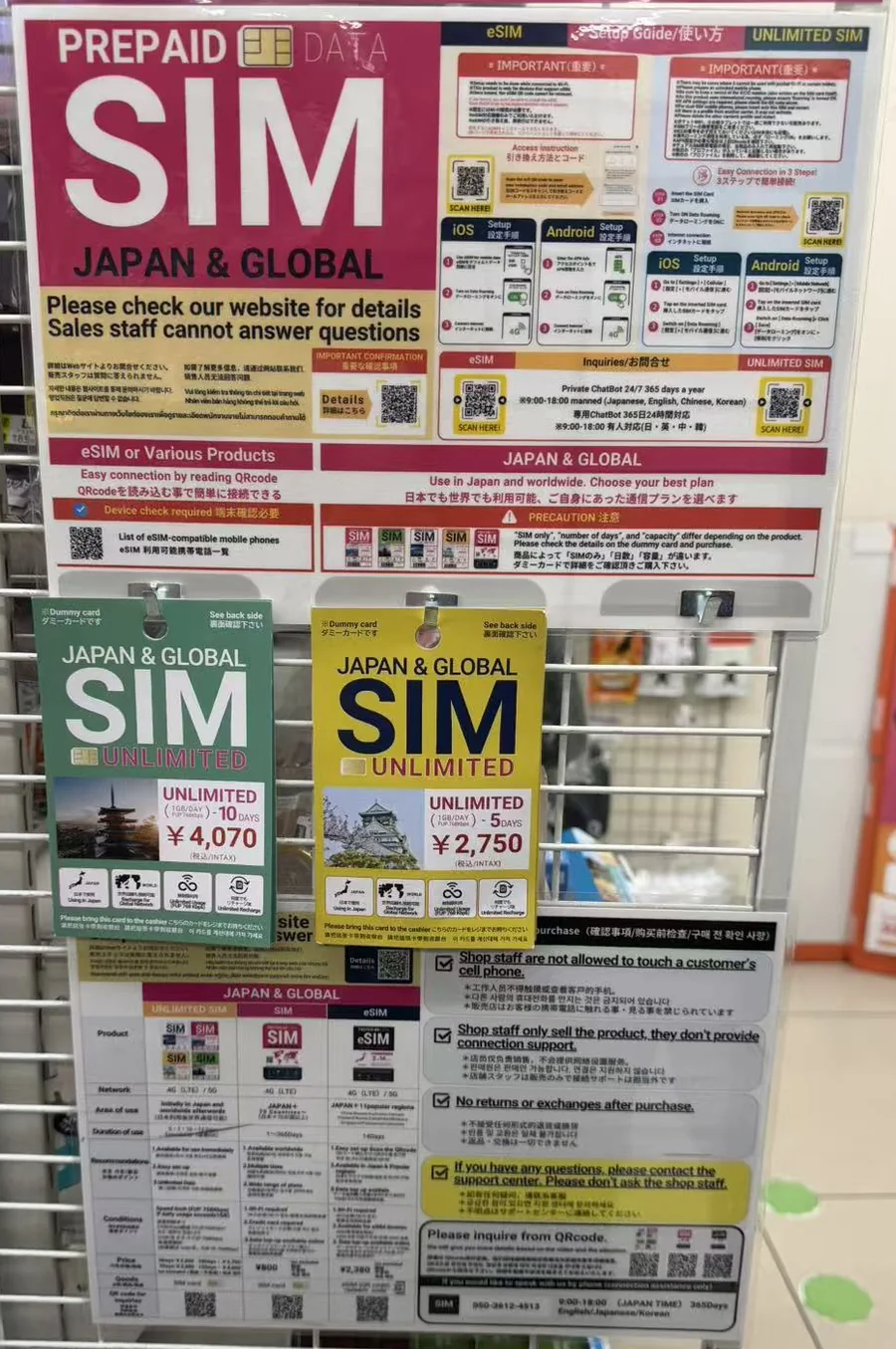
The notices below the dummy cards say four things: staff may not touch your phone; staff sell the card but do not help you connect; there are no returns or exchanges after purchase; and questions go to the company’s support center. The poster lists a 24/7 chatbot, staffed chat from 9 a.m. to 6 p.m. Japan time in English, Japanese, Chinese and Korean, and a phone line with the same hours. It also asks you to check that your phone is compatible before you buy.
None of that is unusual: a convenience store is not a phone store. It does mean that if the card does not connect, the cashier cannot help; you contact the company’s chatbot or phone line instead. An eSIM can fail to connect on arrival too, but it is already installed when you land, and the checklist further down covers the usual fixes.
“Unlimited” at 1 GB a day: what that means
FUP stands for fair-use policy. On this card it means 1 GB a day at full speed; after that the connection keeps working at 768 kbps until the daily allowance resets (the card does not say when). The slower speed, 768 kbps, is under 1 Mbps, a fraction of normal 4G, but enough for maps, messages, email and music; video calls and HD video will struggle. So the card is unlimited in the sense that you are never cut off, not in the sense that you never slow down.
Code eSIM’s Japan day passes work the same way, with one difference: after the daily allowance they slow to 256 kbps, a third of the card’s speed. That still carries messages and email, but maps and web pages load slowly and video does not really work. If you expect to go well past 1 GB on some days, buy a 2 GB or 3 GB a day pass, or a plan with no daily cap.
The Docomo unlimited plans in the table below have no daily cap, so there is no set point each day where the speed drops; their plan pages add that the local network’s fair-use rules may apply, without a published threshold. Not every plan we label unlimited works like this: the standard eSIMPlus “Unlimited” plans we also sell for Japan slow to 200 kbps after 5 GB a day, so read the speed line on the plan page.
What the card costs next to an eSIM
| The card we photographed | Code eSIM day pass, 1 GB a day | Code eSIM Docomo unlimited | |
|---|---|---|---|
| Full-speed data | 1 GB a day | 1 GB a day | No daily cap |
| After that | 768 kbps | 256 kbps | No set slowdown; fair use may apply |
| 5 days | ¥2,750 (about $17.42) | $5.30 | $13.00 |
| 10 days | ¥4,070 (about $25.78) | $7.00 | $23.00 |
| Network | Not stated on the card | NTT Docomo | NTT Docomo |
| Where you buy it | At the register, in Japan | Online, before you fly | Online, before you fly |
| Returns | None after purchase | Within 14 days if never installed or used, with no fee | Within 14 days if never installed or used, with no fee |
Code eSIM prices are as of November 3, 2026. We converted the card’s yen prices at ¥157.90 to the dollar, derived from the European Central Bank’s euro reference rates for November 2. Against the 10-day card, the 1 GB a day pass costs about 27% as much, and the Docomo unlimited plan about 89%: a little less money, and no daily cap.
In between, a 2 GB a day pass costs $10.59 for 10 days and 3 GB a day $12.89, roughly half the card’s price or less. On KDDI’s 5G network, unlimited data at up to 10 Mbps costs $17.49 for 10 days, enough for HD video on one phone; KDDI plans without the 10 Mbps limit cost more, $26.19 for 10 days. All of these use a local Japanese network, so your IP address is in Japan. On the Docomo plans you can also check your remaining data on our website.
For a typical 10-day trip of maps, messages and photos, the cheapest choice is 10 GB for 10 days at $6.39: one allowance to use on any day, which stops when it is used up. Pick the 1 GB a day pass if you do not want one heavy day to eat into the rest of the trip, the 2 GB a day pass if you post a lot, and Docomo unlimited if you stream or share a hotspot. Plans from 1 to 30 days are on our Japan local eSIM page.
Landing day, side by side
| Step | Convenience-store SIM | eSIM bought before you fly |
|---|---|---|
| Before the trip | Check that your phone is unlocked and has a SIM tray, and bring a SIM-eject tool. | Check that your phone is unlocked and supports eSIM. Buy online; the QR code arrives by email. Install it over Wi-Fi at home. |
| After landing | Find a store that stocks the card (not every store does), take the dummy card to the register and pay. | Select the eSIM for cellular data and turn on data roaming for that line only. The plan starts on first use. |
| Setting up | Swap the card into your phone and follow the setup sheet. | Already installed. On Android, if data does not start, add the APN, the connection setting shown on the plan page: vmobile.jp on Docomo plans; on KDDI, uad5gn.au-net.ne.jp with username [email protected] and password au. |
| If it does not connect | Staff cannot help or touch your phone. The brand has a 24/7 chatbot, plus live chat and a phone line from 9 a.m. to 6 p.m. Japan time. | Our eSIM diagnostic page and email support; see the checklist below. |
| Your home number | Out of the phone while the card is in, unless your home line is an eSIM or the phone has two SIM slots. | Stays on the other line, so texts to your number can still reach you, subject to your carrier’s roaming rules. |
| Changing your mind | No returns or exchanges after purchase. | Docomo plans can be refunded within 14 days if never installed or used, with no fee. KDDI plans cannot be refunded once the QR code has been issued, and it is emailed within minutes of payment; each KDDI plan page notes this. |
Our Docomo and KDDI plans count calendar days in Japan time, so the evening you first connect counts as a whole day: land at 9 p.m., and day 1 has three hours left. You can save a day by switching the eSIM on the next morning, but only if you can reach your hotel without data, because airport Wi-Fi stops at the terminal doors. Otherwise switch it on when you land and count the evening as day 1.
The airports’ own pages list free Wi-Fi in the terminals at Narita (network FreeWiFi-NARITA, in every terminal), Haneda (HANEDA-FREE-WIFI, not inside shops), New Chitose for Sapporo, and Fukuoka; you accept the terms on a browser page. If you did not set up an eSIM at home, the same Wi-Fi lets you buy one on arrival. Code eSIM emails the QR code within minutes, with a one-tap install link that works on the same phone, so you do not need a second screen to scan it. It is still easier on your couch than at baggage claim.
If the eSIM does not connect after landing:
- Check the eSIM line is turned on and selected for cellular data.
- Check data roaming is on for that line.
- Turn airplane mode on for 10 seconds, then off, or restart the phone.
- On Android, add the APN shown on the plan page (see the table above).
- Still nothing? Join the airport Wi-Fi and use our eSIM diagnostic page, or email us with your order number. Do not delete the eSIM while troubleshooting: a QR code can normally be installed only once, and the KDDI plan pages say so outright.
Two or three of you on one plan
A SIM card serves one phone. That phone could share its connection by hotspot, but 1 GB a day split between two or three people will not last the day, so in practice two travelers on a 10-day trip need two cards, ¥8,140 (about $51.55), and three need ¥12,210 (about $77.33). One Code eSIM Docomo unlimited plan for 10 days costs $23.00, has no daily cap and lists hotspot as supported, so one phone can share with the others.
On the Docomo plans, type vmobile.jp in the Personal Hotspot APN field, or the other phones may connect but get no data (iPhone: Settings, Cellular, tap the eSIM, Cellular Data Network, Personal Hotspot). Choose Docomo for sharing: the KDDI unlimited plans cap hotspot use, in total, at 1 GB less than the plan’s length in days, which is 4 GB on the 5-day plan and 9 GB on the 10-day plan. Sharing only works while everyone stays within range of the host phone, and it drains that phone’s battery, so carry a power bank. If the group splits up during the day, give everyone their own plan: two 10-day passes at 1 GB a day cost $14.00 together, still less than one shop card.
Your home number, and the SIM tray
A physical SIM card goes in your phone’s SIM tray. If your home line is also on a physical SIM and your phone has only one slot, your own card comes out and has to be kept safe for the whole trip, and texts to your home number do not reach you until it goes back in. If your home line is already an eSIM, the shop card can go in the empty tray and your number stays on.
An eSIM goes on the phone’s second line, so your home line stays in place and texts to your number, including bank and airline codes, can still reach you, subject to your carrier’s roaming rules. Our dual-SIM guide shows how to keep the home line from using roaming data, and what your carrier may still charge for calls and texts.
Turning on data roaming for the Japan eSIM line costs nothing extra: you have already paid for the plan, and many phones will not pass data on a travel eSIM until it is on. Leave data roaming off on your home line, so your own carrier does not charge you.
Neither option gives you a Japanese phone number. The display calls the card a prepaid data SIM, and Code eSIM’s Japan plans are data only too, so use WhatsApp, FaceTime or LINE for calls and your home line for texts. If you need a local number, our guide to getting a phone number in Japan, Korea and China explains the options; none of our plans for these countries includes one.
Who should still buy the card
The card makes sense if your phone has a SIM tray but cannot take an eSIM. It does not help with a phone locked to your home carrier: a locked phone rejects a foreign SIM card just as it rejects an eSIM, and the card cannot be returned. Check your phone on our compatibility list, and ask your carrier to unlock it before you go.
The card also suits you if you often go past 1 GB a day and do not mind slow data, because its 768 kbps is three times our Japan day passes’ 256 kbps. It is the better choice, too, if you want to recharge the same card later, including abroad; our Docomo and KDDI Japan plans cannot be topped up, so when one ends you buy and install another over Wi-Fi. And it is the only one of the two you can pay for in cash, in yen.
Do you need ID to buy a SIM card in Japan?
Not for a data-only SIM, as of November 2026. Japan’s identity-check law covers SIMs with voice calls, and the Ministry of Internal Affairs and Communications (MIC) says in its Q&A on the law that data-only SIM cards are outside it. Code eSIM’s Docomo and KDDI plans for Japan need no registration.
That is changing. MIC says data SIM contracts will also need identity checks from April 2027, and that short-stay visitors using data SIMs may be covered. The details are still being set, so check again before a trip after that date.
At home before you fly
Choose by how you use data, not by guessing gigabytes, then buy and install the eSIM over home Wi-Fi; our install guide has the steps for iPhone and Android. The Docomo and KDDI plans in this post must be installed and first used within 60 days of purchase, so buy no more than two months before you fly. Do not select the eSIM for cellular data until you land: on these plans the countdown starts on the first connection in Japan, not when you install it (more in our guide to when an eSIM starts counting). If you are still deciding between this and a rented router, our eSIM vs pocket Wi-Fi comparison prices a week of each, and our guide to Japan’s mobile networks explains Docomo and KDDI.
How we checked
A member of our team photographed the display in a convenience store in Japan at the start of November 2026. We did not buy or test the card; its terms come from the dummy card fronts and the display, and we did not see the back of the card. Other stores and brands may differ. Code eSIM prices and plan terms are from our plan pages on November 3, 2026. The airport Wi-Fi details are from each airport’s own website, read the same day, and the exchange rate is derived from European Central Bank reference rates for November 2, 2026.