
Yes, you can install an eSIM after you land — but only if you can get online first, and that is exactly what you do not have when you step off the plane. Installing a profile downloads it over the internet. Using it afterwards does not. That one distinction explains every confusing thing about this question.
Picture the version that goes wrong. You land at 11pm after eleven hours in the air. Your home SIM is roaming-disabled because you did not want a surprise bill. The airport Wi-Fi wants a phone number to send a verification code to. Your eSIM QR code is sitting in an email you cannot open. The taxi rank needs an app. That is not a hypothetical — it is the single most common way a perfectly good travel eSIM fails its owner.
Why installing needs internet but using it does not
An eSIM is a profile that lives on a chip already inside your phone. When you scan the QR code, the phone contacts the provider’s server, downloads that profile and writes it to the chip. That download is an internet operation, so it needs a working connection — Wi-Fi, or another line with data.
Once the profile is on the phone, everything changes. Connecting to a mobile network afterwards is a radio operation between your phone and a cell tower. No internet required, because that is how you get internet. This is why you can install at home weeks before a trip and have the thing spring to life the moment you land.
It is also why the two words matter: installation is the download, activation is when the plan starts counting. They are separate events, and on most of our plans activation happens on first data use rather than at purchase — covered in detail in when does an eSIM start counting.
If you have already landed, here is what actually works
You are in the arrivals hall without data. In rough order of how well they work:
| Option | Works? | Watch out for |
|---|---|---|
| Airport Wi-Fi | Usually | Many airports require an SMS code to log in. Your home SIM can receive that text even with data roaming off — texts travel on the signalling channel, not on data. |
| Hotspot from a travel companion | Yes | The cleanest option if someone in your party already has working data. |
| Hotel or café Wi-Fi | Yes | Fine, but it means getting to the hotel first — usually the exact thing you needed data for. |
| Airline or lounge Wi-Fi before landing | Yes | Underrated. If your flight has Wi-Fi, install in the air. |
| Turning on roaming briefly to install | Technically | You will pay roaming rates for that download. It works, but it is the expensive answer to a free problem. |
One thing that trips people up: you need the QR code itself, and that usually lives in an email. If you cannot get online, you cannot open the email. So the single most useful thing you can do before flying takes ten seconds — screenshot the QR code and save it to your photo library. Then the code is available offline even if your inbox is not.
Why we still tell you to install before you fly
Everything above works. None of it is as good as arriving with the profile already on the phone.
Installing at home means you do it on a fast, trusted connection, with time to notice if something is wrong. If the phone turns out to be carrier-locked, or the model does not support eSIM, or you typed the wrong email at checkout, you find out in your kitchen rather than in a queue at passport control. Our device compatibility list settles the first two questions in under a minute, and it is worth checking before you buy rather than after.
The routine that removes essentially all of the risk:
- Buy and install at home, on Wi-Fi. The profile sits dormant on the phone.
- Screenshot the QR code and keep it in your photos, in case you ever need to reinstall.
- Leave the travel line switched off until you land, so nothing starts counting early.
- Turn on data roaming for the travel line only — that setting is per-line on both iPhone and Android, and it is what lets the travel plan work while your home line stays silent.
- On landing, switch mobile data to the travel plan. That is the whole arrival procedure.
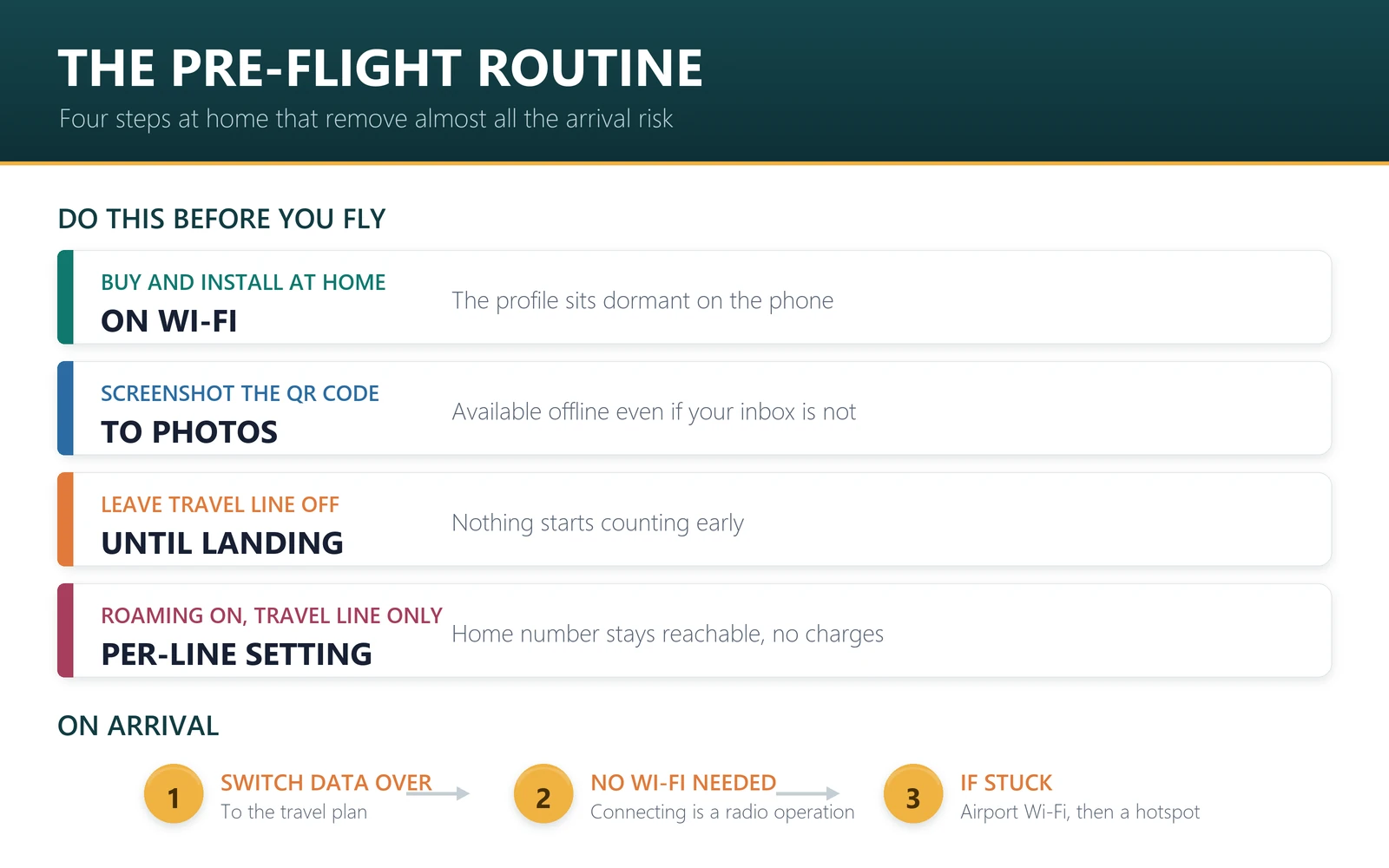
Step four is the one people skip, and it is the one that prevents a surprise bill on your main number. The mechanics are in using a travel eSIM while keeping your own number.
The cases where waiting genuinely breaks things
Three situations where “I will sort it out when I get there” is worse than inconvenient.
Destinations where some services are restricted. If your first stop is somewhere with heavy network filtering, downloading a profile or reaching a particular provider’s server may be unreliable. Install before you cross that border, not after. This applies to mainland China in particular — the China guide covers it, and it is a real reason to sort connectivity out in advance.
Airports with no free Wi-Fi at all. They still exist, and they are disproportionately in the places where you most want a working map on arrival.
Late-night or remote arrivals. A small regional airport at midnight may have no open counter, no staffed information desk, and Wi-Fi that needs a code nobody is around to help with.
What to buy if you are sorting this out now
If you are reading this before a trip, these install in a couple of minutes on home Wi-Fi and stay dormant until you land. Prices are from our catalogue on 22 September 2026 and move daily — each plan page is the live version.
| Destination | Plan | Price |
|---|---|---|
| Japan | 10 GB / 15 days | $7.40 |
| Turkey | 12 GB / 30 days | $8.20 |
| Europe | 20 GB / 30 days | $13.03 |
| Australia | 10 GB / 30 days | $7.00 |
| Thailand | 10 GB / 30 days | $7.00 |
If your route crosses a border, read whether one eSIM covers multiple countries first — a regional plan is sometimes both broader and cheaper than a single-country one.
Frequently asked questions
Can I install an eSIM without internet?
No. Installing downloads the profile from the provider’s server, so it needs Wi-Fi or another working data connection. Using the eSIM afterwards needs no internet — connecting to a mobile network is what gives you internet in the first place.
Can I use airport Wi-Fi to install my eSIM?
Usually yes, and it is the normal fallback. The catch is that many airports send a login code by SMS. Your home SIM can still receive texts with data roaming switched off, because texts do not travel over data.
What if I cannot open the email with my QR code?
Screenshot the QR code before you fly and keep it in your photo library. Then it is available offline. If you did not, you will need any working connection — companion hotspot, airport Wi-Fi, or hotel Wi-Fi — to reach your inbox.
Will installing early waste days of my plan?
On most of our plans, no. Validity starts on first data use rather than at purchase or installation, so a dormant profile costs you nothing. Each plan page states its activation policy, so check that row if you are buying far in advance.
Can I install an eSIM on the plane?
If the aircraft has Wi-Fi, yes, and it is a good moment to do it. The profile downloads over that connection and sits ready. Without onboard Wi-Fi, the phone cannot reach the server, so installation has to wait.
Does reinstalling an eSIM cost anything?
Reinstalling is a technical step, not a purchase, but many profiles can only be installed a limited number of times — sometimes once. Do not delete a working profile casually, and keep the QR code screenshot in case reinstallation is permitted.
Should I turn on data roaming?
Yes, for the travel line only. Both iPhone and Android set this per line. That combination — roaming on for the travel plan, off for your home line — is what lets the eSIM work while your own number stays reachable without charges.
Installation and activation are two different events, and almost all the confusion about eSIMs comes from treating them as one. Download at home where it is easy. Let it start counting when you land. And screenshot the QR code, because the version of you standing in an arrivals hall at midnight will be grateful.